WhatsApp Dynamic Message: A Complete Guide

No Credit Card Required
Want To Send Bulk SMS?
If yes, then test our service for FREE.
Get a 1 Month Free Trial of WhatsApp Business API
In the marketing industry, reaching numerous clients at a time is such a mess. But WhatsApp automation has become one of the most helpful ways for companies to connect with them in real time. Automating the communications using WhatsApp business API, businesses can share timely notifications, alerts, and promotions – everything at scale without losing the personal touch.
The best part of this technology is customized communication. Generic, one-size-fits-all messages usually get avoided, but scaled messages develop trust and drive conversions. Using dynamic fields like customers’ names, order updates, or appointment timing, it feels more relevant and human.
Now, WhatsApp dynamic messages have something that gets you. It lets the brands create flexible message templates that automatically insert client-specific details. Rather than writing many variations for each case, you make dynamic templates to make communication efficient.
What are WhatsApp Dynamic Messages
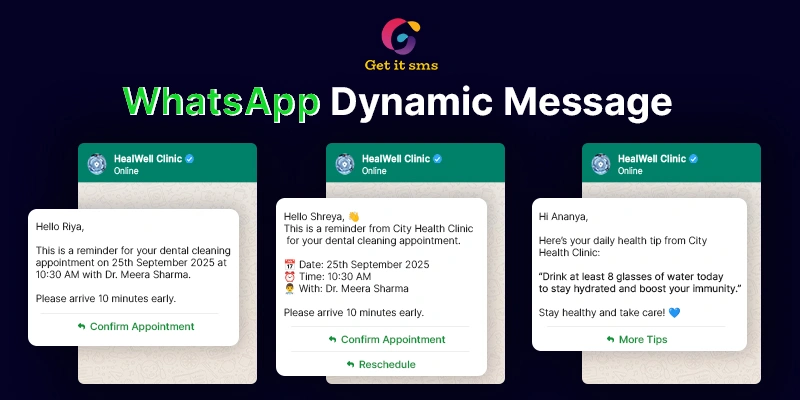
WhatsApp dynamic message templates are the kind of automated messages shared via WhatsApp API that consist of customized, variable content. WhatsApp message templates are the pre-defined formats offered by Meta for organizations in order to allow proactive communication with their users. These messages are completely dynamic and adapt to each recipient by adding details like names, delivery updates, appointment timing, and order IDs.
The basic difference between Static vs. Dynamic Messages
- Static messages are fixed in messages—all receivers receive the same language. For example: “Your order has been dispatched.”
- Dynamic messages use placeholders that send real-time data to all users. For example: “Hi Johna, your order #2541 has been packed and will come on Sept 25.”
Real-World Examples of WhatsApp Dynamic Messages
- Order Confirmations:
“Hi Max, we’re grateful to offer you the best services! Your order [order number] will be delivered by tomorrow.
- Appointment Reminders:
“Hello Shreya, this is a booking reminder of your dental appointment booked for [Date & time].”
- Delivery Updates:
“Your order with tracking ID #LZ4321 is out for delivery today.”
- Event Notifications:
“Hi Rachel, your ticket for Music Fest 2026 is approved. The event starts at 7:00 PM.”
Benefits of Using Dynamic Message Templates
Implementing dynamic messages through WhatsApp gives clear advantages for both businesses and clients. By merging automation with customization, brands can accomplish a more engaging conversation at scale.
1. Higher Engagement with Personalization
Recipients are far interested in reading and replying to messages that are relevant to them. The dynamic fields are names, order details, or appointment times – each message unique, enhancing open rates, engagement, and conversions.
2. Improved Customer Experience
Such messages deliver on time, accurate, and context-aware updates. While it’s the shipping details, payment reminder, event tickets, and customer appreciation conversation that feel aligned and helpful, rather than generic.
3. Scalability for Businesses
Rather than sending customized messages manually, companies can set up one template with dynamic variables. It makes it easy to send multiple custom messages at the same time, lowering manual work while keeping a personal touch.
4. Reduced Errors and Consistency
Automation ensures that user details are fetched directly from your system, lowering the chance of mistakes like sharing the wrong order number or appointment time. It creates trust and reliability.
5. Cost-Effectiveness
Growing engagement and lessening manual workload, companies save resources while bringing more conversions from each message shared.
WhatsApp Message Templates with Dynamic Fields
To integrate the popular tool, companies should create message templates – a pre-approved format that ensures compliance and consistency. These dynamic WhatsApp message templates include both static and dynamic fields that are automatically replaced with customer-specific details at the time of sending.
How Dynamic Placeholders Work
Dynamic placeholders are shown as {{1}}, {{2}}, and more on. Each placeholder contains the variable you define, like the buyer’s name, order number, or delivery date. When the message is shared, the system gets the real-time data to replace these placeholders.
For example:
- Template: “Hi {{1}}, your order {{2}} has been packed and will be delivered on {{3}}.”
- Output: “Hi Sarah, your order number #2541 has been received and will be shipped on Sept 25.”
Examples of Dynamic Template Messages
1. Order Confirmation
Template: Hi {{1}}, we are happy to serve you! Your order {{2}} has been processed successfully.
Output: Hi Marie, we are happy to help you! Your order #9823 has been processed successfully.
2. Shipping Update
Template: Good news, {{1}}! Your product with tracking ID {{2}} is on its way. Estimated delivery: {{3}}.
Output: Good news, Maria! Your product with tracking ID LZ4321 is on its way. Expected delivery: Sept 22.
3. Appointment Reminder
Template: Hello {{1}}, this is a notification for your appointment on {{2}} at {{3}}.
Output: Hello Alex, this is an alert for your appointment on Sept 24 at 2:00 PM.
By merging these templates with dynamic fields, organizations can manage compliance while offering custom, timely, and scalable customer conversations.
WhatsApp Button Custom Dynamic Options
Creative buttons take WhatsApp messages to the next level by making it simple for clients to take quick action. While pairing with dynamic fields, the buttons become even more helpful – giving customized links or options that increase both engagement and convenience.
How Dynamic Buttons Improve User Interaction
Apart from sharing text guidelines, companies can insert clickable buttons that direct to a customized address. It lowers friction, saves time for buyers, and grows the likelihood of completing actions like tracking an order, confirming an appointment, or making a transaction.
Examples of Dynamic Button Use Cases
1. “Track Order” Button
Template button: “Track Order” → {{tracking_url}}
Example: A recipient gets a message including a clickable button that opens their unique tracking page:
“Hi Smith, your order #2541 has been packed and will be delivered shortly.” → [Track Order]
2. “Pay Now” Button
Template button: “Pay Now” → {{payment_link}}
Example: A customer receives a custom payment reminder with a direct link to their bill:
“Hi John, your cost of $45.00 is due.” → [Pay Now]
3. “Confirm Appointment” Button
Template button: “Confirm Appointment” → {{confirmation_url}}
Example:
“Hello Maria, please ensure your appointment is scheduled for Sept 25 at 3:00 PM.” → [Confirm Appointment]
Best Practices for Button Customization
- Make short button text and clear (e.g., “Track Order,” “Pay Now,” “Confirm”).
- Always make sure dynamic links are safe and unique to each client.
- Limit to a few relevant buttons (WhatsApp allows up to 3) to bypass overwhelming users.
- Test dynamic URLs before transmitting to ensure they are fixed correctly.
- Use action-oriented language to increase engagement.
How to Create WhatsApp Dynamic Messages
Designing WhatsApp messages dynamically is simple when you use the API or work through a Business Solution Provider (BSP), GetItSMS. The process blends creating an approved template, adding variables, and testing before sharing.
Step 1: Choose Your Platform
- If you’re using a BSP (e.g., GetItSMS, Getgabs), log in to their dashboard and access the template creation section.
- If you’re operating directly with the WhatsApp Business API, your WhatsApp scheduled message template should be organized in JSON format.
Step 2: Create a Message Template
- Describe your base message with both static and dynamic components.
Example: Hi {{1}}, your order {{2}} has been confirmed. Expected date of delivery: {{3}}.
- Approve your WhatsApp template (BSPs usually simplify this process).
Step 3: Add Variables (Dynamic Fields)
-
- Employ placeholders like {{1}}, {{2}}, {{3}} to show dynamic values.
- Align these variables to real-time data (e.g., customer name, order ID, delivery date).
- Example mapping:
-
- {{1}} → Customer name (“Sarah”)
- {{2}} → Order number (#2541)
- {{3}} → Delivery date (Sept 25)
Step 4: Test Your Template
- Share a test message to yourself or your team before sending it in real time.
- Check that:
- All variables are revised correctly.
- Links, buttons, and formatting display as hoped.
- There are no spelling or data-mapping issues.
Step 5: Automate and Scale
- When the templates are tested, use the template in your customer journey (e.g., order confirmations, alerts, or support updates).
- Automation guarantees every customer gets customized updates at the right time—without manual action.
Best Practices & Tips to Use Dynamic Templates
The benefit of using WhatsApp dynamic templates is the balance between personalization and professionalism. Go through the tips and best practices to increase engagement while adhering to compliance.
1. Keep Messages Short and Clear
The most helpful and conversational channel – WhatsApp offers quick, easy-to-read updates to clients. Keep simple wording, show the key details, and skip using long paragraphs.
2. Don’t Overuse Dynamic Fields
As customization is effective, adding multiple variables can make messages feel robotic or spammy. Concentrate on the important details like customer name, order number, or delivery date.
3. Follow WhatsApp Template Approval Policies
Each message template should be approved by Meta. Don’t consider promotional or misleading content, and always ensure your templates follow WhatsApp’s guidelines for clarity, accuracy, or user value.
4. Provide Clear Call-to-Actions (CTAs)
Include action-oriented messages, where possible, add effective buttons (e.g., “Track Order,” “Pay Now”) to lead users toward the next step with low effort.
5. Test Before Scaling
Run internal checking to verify placeholders are working properly and links/buttons direct to the right address. A small mistake can drive a big loss and impact thousands of buyers.
Use Cases Across Industries
See how these industries are leveraging the WhatsApp templates to grow their business.
1. E-commerce
The online business owners depend completely on WhatsApp to keep their customers updated and connected throughout their shopping journey. They communicate with them regarding these:
Order Confirmations: Customers receive a custom confirmation message just after purchase with their name and order ID.
Example:
“Hi Nick, thank you for shopping with us. Your order #2541. We’ll update you once it’s shipped.”
Shipping & Delivery Updates: Customers can track their orders with dynamic tracking IDs in real time.
Example:
“Your order #2541 is out for delivery today. Track your package: [link].”
Cart Recovery: Sending custom reminders to customers for abandoned carts urges them to complete checkout.
Example:
“Hi Bunny, you left {{product_name}} in your cart. Proceed with the order today and avail exciting offers.”
2. Travel & Hospitality
The travel and hospitality industries are also leveraging the feature to boost trip management and improve the customer experience. They can send the following messages:
Flight Details & Reminders: The passengers receive flight confirmations, gate updates, and boarding times personalized for their booking.
Example:
“Hi Maria, your flight AI302 to London departs at 10:30 AM from Gate B12. Boarding starts at 9:45 AM.”
Hotel Booking Confirmations: Visitors receive real-time updates for their check-in/out dates, room details, and hotel contact details.
Example:
“Hello Alex, your booking is confirmed at [Hotel name]. Check-in: Sept 25, 2:00 PM. Check-out: Sept 28, 11:00 AM.”
Travel Itinerary Updates: Tour operators can send dynamic updates with customer names and trip details.
3. Healthcare
In the healthcare industry, WhatsApp dynamic message templates are used to lower no-shows and enhance patient care.
Appointment Reminders: Patients receive automated reminders including the doctor’s name, date, and time.
Example:
“Hello, Dr. Patel’s patient, this is an alert for your appointment on Sept 22 at 3:00 PM.”
Prescription Alerts: Pharmacies inform patients when prescriptions are ready or need renewal.
Example:
“Hi Emily, your prescription for Amoxicillin is ready for pickup at GreenCare Pharmacy.”
Post-Visit Follow-ups: Custom instructions or care reminders after meetings.
Common Mistakes to Avoid
- Wrong Variable Mapping – If dynamic fields are not aligned correctly, users may get messages with missing or incorrect information(e.g., “Hi {{1}}, your order {{2}} is verified”). Always check before sending to make sure placeholders contain the right data.
- Sending Unapproved Templates – Meta needs all message templates to be pre-approved. The unapproved templates can result in delivery failures or an account ban. Always offer your templates for approval with the help of a WhatsApp Business API or your BSP, like GetItSMS.
- Over-Customization That Confuses Users – Multiple fields can make the message hard to read or feel irrelevant. Remember to add important details like name and order ID, while keeping the entire message simple and clear.
- Ignoring User Preferences – Sending so many messages to customers irritates them or leads to opt-outs. Be with sending only relevant updates and appreciate user conversation choices.
- Weak Testing Before Scaling – Missing internal tests can cause large-scale mistakes (wrong links, mismatched data, broken buttons).
Conclusion
WhatsApp dynamic message templates merge the best of automation and customization – guiding companies to offer timely, relevant, and engaging messages at scale. Using the dynamic parameters, businesses can go beyond the generic updates and create a customer experience that feels personal and valuable.
From enhanced engagement rates to increased customer satisfaction and aligned details, the benefits are effective. Whether it’s confirming orders, sharing alerts, or sending custom offers, dynamic messaging makes sure every communication counts.
Now, it’s up to you to adopt WhatsApp Business API with dynamic communication and take your business to the next level. Embrace personalization today to see stronger conversations, happier clients, and a competitive edge tomorrow.
Frequently Asked Questions
Regular static messages share the same message to everyone, while dynamic messages are based on the customer's detail that changes periodically for each customer. It makes them more relevant and engaging.
You can change specific details like customer names, order IDs, delivery dates, tracking links, appointment times, payment details, and more - based on the use case.
Of course, Buttons such as ‘Track order, Pay now, or Confirm appointment’ can use custom links, giving customers immediate access to their respective actions.
Always check the messages before sending at scale. Double-check variable alignment to make sure placeholders get the right customer detail.
Yes, each message template before sending requires Meta approval to ensure adherence to WhatsApp’s compliance.



 within 24
Hrs +
60
Days Free API Panel
within 24
Hrs +
60
Days Free API PanelRecent Posts