

 within 24
Hrs +
60
Days Free API Panel
within 24
Hrs +
60
Days Free API Panel
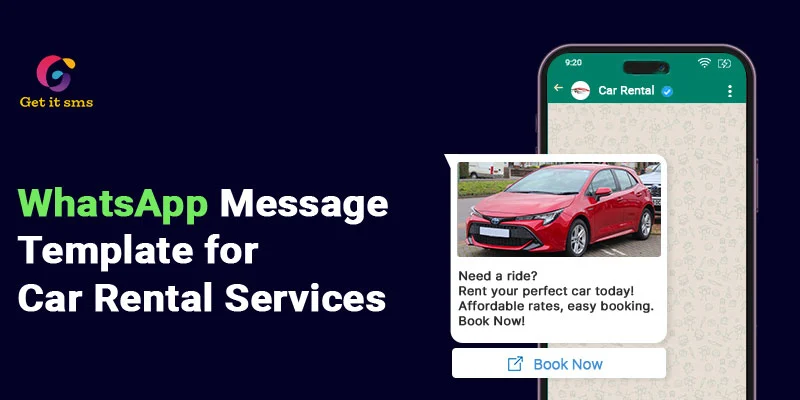
How to Use WhatsApp Business API for Car Rental Services?
 4 minutes read
Last Updated :
September 26, 2026
chat_bubble
Want To Send Bulk SMS?
If yes, then test our service for FREE.
Want To Send WhatsApp Msg?
If yes, then test our service for FREE.
code
Get a Free Trial of WhatsApp API
In the car rental business, instant reach is everything. Every missed message is a missed booking.
Imagine a customer needs a car for the weekend. They reach out to your business, wait for 30 minutes, and get no reply. Result? Lost booking, frustrated customers, and revenue left on the table.
This happens every day. But phone calls go unanswered, and emails get lost in a crowded inbox. What’s the solution? WhatsApp Business API for car rental services solves all of these.
With over 2.7 billion active users and a 98% open rate, WhatsApp is a channel where your customers are. Businesses can use WhatsApp to drive more leads to the automobile industry.
Integration of the WhatsApp Business API for car rental services enables you to automate booking, send real-time updates, reduce drop-off, and deliver 24/7 support. This guide will help you learn how to use the WhatsApp API for your car rental business to boost sales.
What is WhatsApp Business API for Car Rentals?
WhatsApp Business API for car rentals is an enterprise-grade communication tool that lets businesses automate and scale communication while managing bookings. It simply connects your WhatsApp business number directly to your booking engines and CRM system via API to transform the messaging app into a 24/7 self-service portal.
It is a complete business tool built for scale, speed, and serious businesses’ growth. Unlike the basic WhatsApp Business app that supports basic auto-replies, the API lets car rental businesses automate replies, send bulk messages, manage multiple conversations, and streamline customer engagement without any technical know-how. Here’s what WhatsApp API integration lets car rental businesses do:
- Enables customers to check availability and book a car 24/7.
- Securely request and collect required documents like a driver’s license within chat.
- Collect rental fees and deposits with secure in-chat WhatsApp payments.
- Manage thousands of customer chats from a single number.
It turns your simple messaging platform into a powerful booking and customer service tool that your car rental business has ever used.
Benefits of WhatsApp Business API for Car Rental Service
Deploying WhatsApp Business API into your car rental services offers numerous benefits like improved response times, lower manual workloads, and 24/7 availability. Let’s have a look at some of the others:
1. Instant Customer Communication
Car rental customers do not wait. If you’re not able to reply on time, they simply move on. WhatsApp Business API keeps your business available 24/7 via an AI chatbot.
It lets you address queries, confirm reservations, and update customers in real time. Companies that are already using chatbots have reported a 35% reduction in their response time.
2. Higher Engagement Rate
Customers are more likely to read and respond to the WhatsApp message when compared to traditional emails or SMS, making it ideal for time-sensitive travel updates. The automobile industry that is already using it has achieved 45-60% better conversion than 2-5 % from email or SMS.
3. Cost-effective solution
In the competitive market of car rental services, phone support and SMs can be expensive. The API reduces this cost by automating repetitive tasks like booking confirmations, payment reminders, and FAQs responses to let your team focus on more important tasks.
4. Improved operational efficiency
By incorporating the business API, the car rental owner can streamline and automate their complete operations, like booking confirmations, vehicle updates, and a lot more, with no fingers being lifted by their team.
5. End-to-End Encryption for Customer Privacy
You have sensitive information, such as driver’s licenses, personal information, and payment details, and your customers need to know that they are protected. With end-to-end encryption offered by API, each conversation between you and the customer is completely private and ensures no third party can access this information.
6. Enhanced customer support
Car rental owners can offer instant and automated replies to commonly asked queries like fuel policy, extra driver charges, and others with quick replies and a smart chatbot. You can even route complex queries to a human agent when needed, making the customer experience smoother.
7. Data and analytics insights
Automotive rental car operators can even track their message response time, open rate, and customer engagement patterns. These valuable insights help you make data-driven decisions to optimize your marketing strategies.
8. Verified Profiles to Build Instant Credibility
WhatsApp Business API enables you to get a verified blue tick verification badge beside your brand name to stand out from other car rental companies. It instantly builds trust and assures customers that they are talking to a reliable brand.
How to Use WhatsApp Business API for Car Rental Services?
Here’s how car rental services use WhatsApp Business API for their business:
1. Generate Leads with Click-to-WhatsApp Ads
Run Click-to-WhatsApp ads on Facebook or Instagram to fill your booking pipeline with qualified leads.
- Customers tap the ad and land directly inside your WhatsApp chat.
- A chatbot greets them with a welcome message, collects their details, and qualifies the lead.
Result: Your sales team will only receive warm and ready-to-book leads.
Example: A car rental company runs a weekend deal ad. Customers click, connect, and book right inside WhatsApp without ever visiting the website.
2. Answer FAQs Automatically with a WhatsApp Chatbot
Deploy an AI-powered WhatsApp chatbot to handle all your repetitive customer queries at any time of the day.
- Customers can select their query from the menu of questions like pricing, documents, or fuel policy, and get instant answers.
- A chatbot can even transfer a complex query to a live agent with complete chat history.
Result: It reduces workload and enables your support team to focus on high-value tasks.
Example: A customer asking for rental documents at midnight gets an instant response with a clear checklist via chatbot.
3. Send Promotional Offers via WhatsApp Broadcast
WhatsApp broadcasting is the most effective way to promote your car rental deals to opt-in customers.
- Segment your customer list and tag them based on rental history, location, and car reference for targeted messaging.
- Send personalized offers and direct booking links to 1000+ customers in a single go.
Result: Message lands directly in the customer’s inbox and gets read within minutes.
Example: A rental business sends a “Book this weekend to get 20% off on your booking” broadcast to 500 customers. Within a few hours, 30 customers confirmed their booking.
4. Manage Team Collaboration with Shared Inbox
Manage multiple customer conversations in a single place with a shared team inbox.
- Incoming chats will automatically be assigned to the right agent based on the query.
- Agents can even tag other team members, share internal notes, and use saved replies under the same inbox.
Results: It ensures no missed messages, no double replies, and no customer left waiting for the right person’s availability.
5. Request feedback on car rental services
Turn each completed rental service into a review opportunity.
Set up an automated message triggered 30 minutes after every completed rental.
- Ask your customer to rate their experience with a simple 1-5 scale or quick reply buttons.
- Send a direct link to leave a Google or social media review.
Result: A genuine review collection without your team having to contact every single customer again and again.
Example: After rental services, your customer receives a message like “Hey [Name], tell us about your ride. Rate us from 1 to 5.
6. Send Real-Time Vehicle Availability and Return Reminders
Keep your customer well-informed at every step.
- Automatically send real-time updates regarding booking confirmation, vehicle availability, pickup instructions, and return reminders.
- Trigger a return reminder 2 hours before the due time.
Results: Lower late returns, fewer customer complaints, and smoother operations.
Example: A customer renting a car for 3 days gets an automatic reminder 2 hours before the return. Like, “Hi Alex, your rental ends at 6 PM today. Need an extension? Reply Yes or No.”
WhatsApp Templates for Car Rental Services
Use predefined WhatsApp message templates to connect with your customers and fulfill their requirements:
1. New model in stock WhatsApp message
This WhatsApp template can increase engagement and bookings for a new car model for rent by 3x.
“Hey Shivam, Good Day! A new car model has been added to the website. Click the ‘Check availability’ button to view its details and availability. Be the first one to book the new model.”
2. Out-of-stock & upsell car rental WhatsApp message
With this template, upsell another car for rent to users when the vehicle they selected goes out of stock.
“Hey Parth, This is Genie from XY Motors. I know you want to book [car name] for rent in white. I’m sorry to inform you that the car is out of stock. Would you like to see another vehicle? Reply with ‘Yes’ or ‘No’”
3. Book a test drive WhatsApp message
Allow users to book test drives for cars through this WhatsApp template
“Dear customer, thank you for showing interest in our cars. Would you like to book a test drive? Contact us to schedule your test drive. Thank you.”
4. Follow-up post-request WhatsApp message
Convert customers who have shown interest in car rental or follow up with them through this WhatsApp template.
“Hey Shubham, it was good to hear from you. You can call me whenever you need a car to drive. Contact us at our given details.”
5. Car inquiry WhatsApp message
Communicate with users interested in hiring a car through this WhatsApp template.
“Hello Nitin, I’ve seen you were interested in the [car name]. Are you interested in booking a car for [place]? We would be glad to help you with renting cars. Select from these: ‘Car on rent’ and ‘Call us.’”
6. Car booking confirmation WhatsApp message
To successfully book a car, send a WhatsApp message with this template.
“Dear John, your booking has been successfully confirmed! Our executive will drop the car off at your pickup location. You can drop a message on WhatsApp or call anytime for support. Enjoy your ride.”
7. Follow up with a referral WhatsApp message
Use this template to get referrals from clients who have used your services in the past.
“Hey, I’m Amit from XYZ company. Refer your friends and get 20% off your next car rental. You can chat here or call me to discuss your needs further when you need service.”
8. Feedback request WhatsApp message
Use this WhatsApp template to get 50-60% of customers to give reviews for your service.
“Thank you for giving us a chance to serve you. We would be happy if you could share your experience. Click the button to share your review.”
9. Car event invite WhatsApp message
This WhatsApp template will attract three times more people to the car event invitation.
“Hey Smith, XCZ Motors wants to invite you to come to our car sales event on [date & time]. Confirm your slot before it is booked.”
10. Car due payment clearance WhatsApp message
Use this WhatsApp template to remind users to clear their due payments.
“Shreya from XYZ Motors! Please make your payment online to confirm the service. Tap ‘pay now’ to make payment through [NEFT/IMPS/UPI/Debit].”
How to Get WhatsApp Business API for Car Rental Businesses?
To get the official WhatsApp Business API, go through these easy steps to leverage it for your business:
- At the initial level, sign up or log in to the Getgabs panel.
- Move to manual onboarding on the left-side panel.
- To create an app, a Facebook developer account is used.
- Link a non-WhatsApp or new WhatsApp number to the API setup.
- Upload the required documents, like GST and MSME, to verify your company account on Meta. Verify that the business number will be used for the API.
- Move to the Getgabs app and add the needed details, including app ID, phone number, and display. Once details are added, the account status will be changed to Green.
Congrats, you’re done! Start message broadcasting now to your clients.
Best Practices Every Car Rental Business Should Follow
Once you have set up the WhatsApp Business API for car rental businesses, it is important to follow some of the best practices to get the best results:
- Get Opt-In Before Messaging: Only send a message to customers who want to hear from you. Always collect a clear opt-in at booking, on your website, or QR codes in-store. It keeps you compliant with Meta’s policies.
- Use pre-approved templates: All your business-initiated messages must use a pre-approved WhatsApp template. Always use the right one with the right purpose.
- Personalize each message: Add the customer’s name, vehicle model, or purchase details in your message to make it feel more personal and professional. Such messages lead to better response rates.
- Keep Messages Short and Clear: Don’t overdo it. Keep your every message focused on one specific action, like book, confirm, pay, or review.
- Track Your Analytics Weekly: Monitor your open rates, response time, and drop-off points to know exactly what’s working for you and what’s not. Adjust your strategy based on the real data, not just assumptions.
Conclusion
WhatsApp Business API for car rental services is something that separates growing businesses from those that are left behind. It is a powerful tool that simplifies operations, improves customer experience, automates conversations, and scales marketing. From generating qualified leads with click-to-WhatsApp ads and handling bookings to follow-ups with manual efforts, the API handles it all for you while using the most popular messaging app.
Your customers are already on WhatsApp. The question is not whether your car rental business needs the WhatsApp Business API or not. How long can you afford to go without it? It is the perfect time for you to integrate the WhatsApp Business API for your car rental company to stop losing bookings and leaving tons of revenue on the table. Ready to transform? Get connected with official WhatsApp Business API providers like GetItSMS or Getgabs today to set up your car rental company on WhatsApp. From onboarding to automation, the platforms make the whole process simple and fast.
Frequently Asked Questions
To get started, your rental business needs to set up a Meta Business Manager account, complete business verification, and connect an official phone number via a Meta-approved Business Solution Provider like GetItSMS.
Any automotive business can use it, including car rental companies, auto parts retailers and distributors, fleet management services, driving schools, and car accessory shops.
For businesses with no earlier Meta Business presence, the process can typically take between 2 and 24 days. However, having your business documents ready and your Facebook account verified in advance can speed up the process.
No. WhatsApp API follows Meta’s conversation-based pricing model. You get charged by Meta for every 24-hour conversation. It also depends on who initiated the chat and the country as well.
It eliminates long waiting times by enabling car rental brands to send instant booking confirmations, answer queries via a WhatsApp chatbot, and share real-time vehicle updates, all in one place.
Get your business on WhatsApp with GatitSMS
Try for freeRecent Posts