Learn to Read SMS Sender IDs and Avoid Spam SMS

No Credit Card Required
Want To Send Bulk SMS?
If yes, then test our service for FREE.
Get a 1 Month Free Trial of WhatsApp Business API
Traditional yet most efficient marketing method, SMS marketing has been used by many small businesses to reach their customers as much as possible. Text SMS is a possible way to connect with a business’s clients in an easy way through a default SMS app. But sending Bulk SMS to people can be noticed as spam. The messages can be tagged as spam or unverified; hence, they do not achieve a high open & response rate.
Most of the users don’t trust the source of SMS as it falls into spam or phishing scams. Understanding the kind of SMS you receive on your mobile helps to protect your personal details, avoid scams, filter useful messages, and report suspicious activity.
Each of the messages contains a sender ID, which acts like the name of the sender. The IDs can be numeric or alphanumeric, for example “AM-ZOMATO” or “VK-ICICIB”. Knowing how to read and understand these sender IDs, you can identify the verified or potentially harmful spam messages.
Let’s begin!
Understanding SMS Sender IDs in India
The SMS Sender ID is a display name in text that appears on the top of your device’s screen and is used to recognize the sender of a message. The SMS Sender ID is just a text message format.
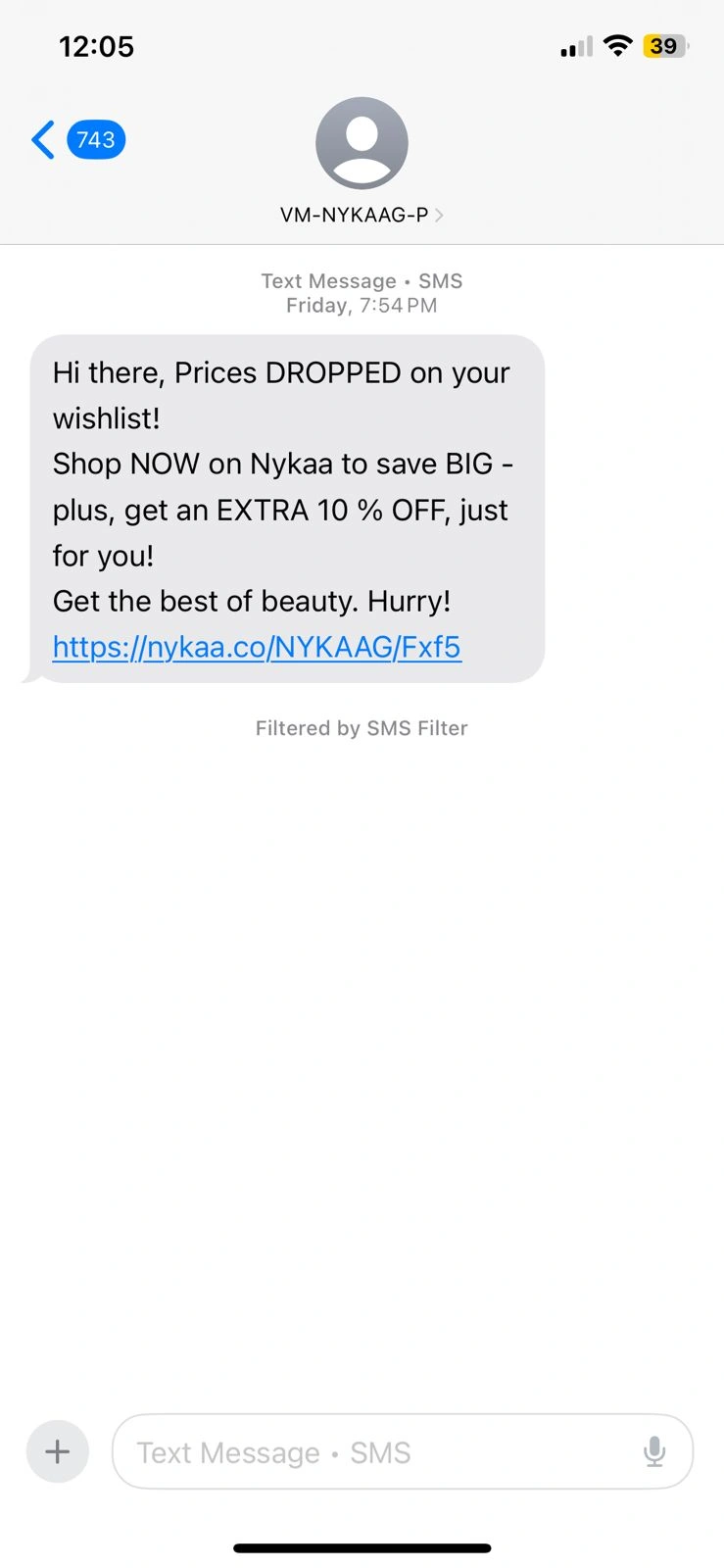
In this message, VM-NYKAAG-P is the SMS sender ID.
What is the maximum length for an SMS sender ID?
The maximum number of characters allowed for sender SMS ID is 11 if it’s alphanumeric. But if it’s a numeric value, the highest number allowed is up to 15 digits.
Hence, there are two kinds of sender ID maximum lengths, based on whether you’re using alphabets or numbers.
| Alphanumeric sender ID (Letters) | Maximum 11 |
| Numeric Sender ID (Digits) | Maximum 15 |
Types of SMS Based on Sender ID
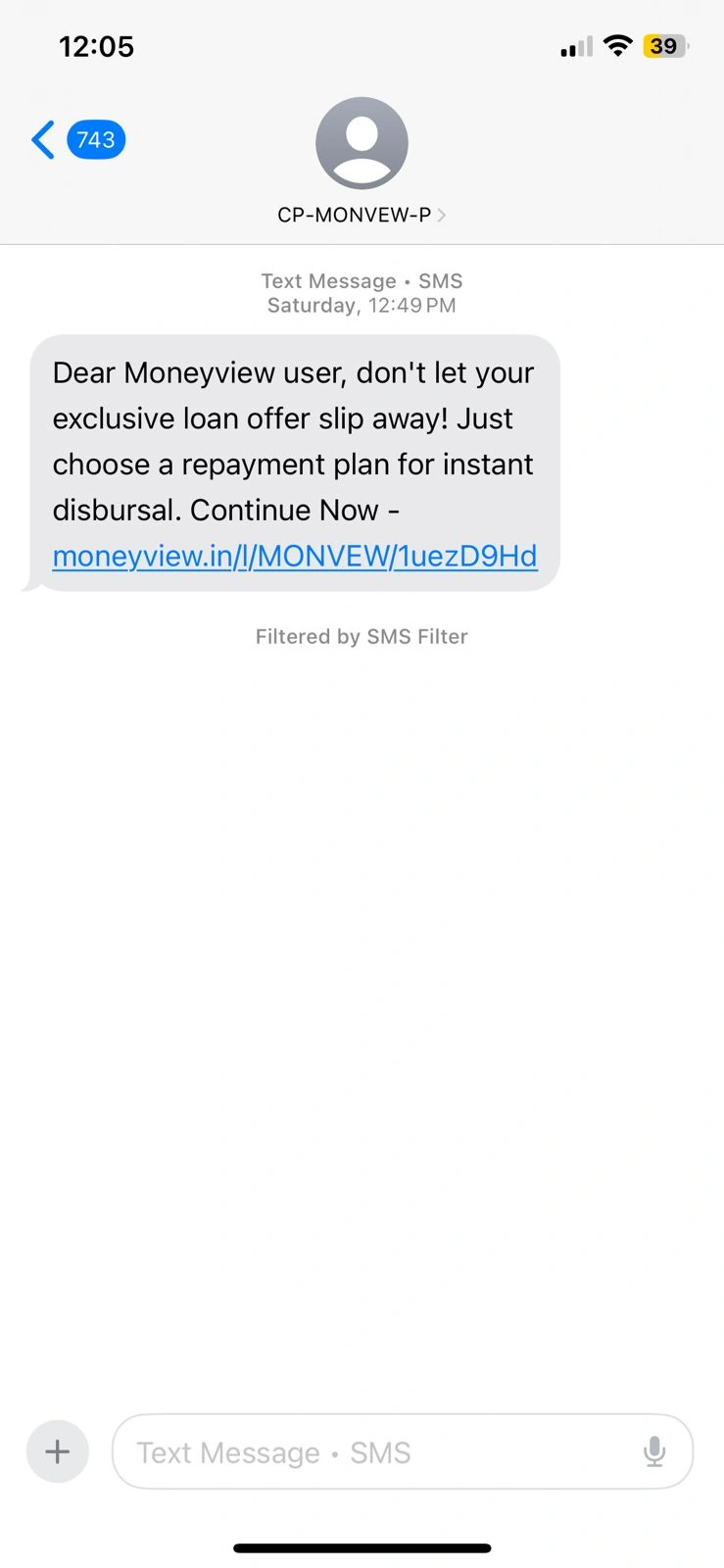
1. Promotional SMS (P)
Promotional SMS shared via text messages is designed to market or promote a business brand. As per the TRAI guidelines, these messages are just used to be sent during particular hours, generally between 9 AM to 9 PM. The messages should follow the content limitations to avoid misuse, ensuring the companies do not share spam or irrelevant promotional text.
Purpose: These messages are aligned to market business products, events, or new launches. It consists of marketing deals, offers, product announcements, and marketing discounts.
Delivery Window: Allowed to send only during business hours (9 AM to 9 PM) as per TRAI regulations.
User Control: These messages can be blocked by activating DND (Do Not Disturb) on your number.
Common Use Cases:
- “Get 60% off on your next shopping trip!”
- “Offer valid for today – flat 80% off!”
Tip: If you’ve activated DND and are still getting such messages, report them via your telecom provider.
Sender ID Example: CP-MONVEW-P
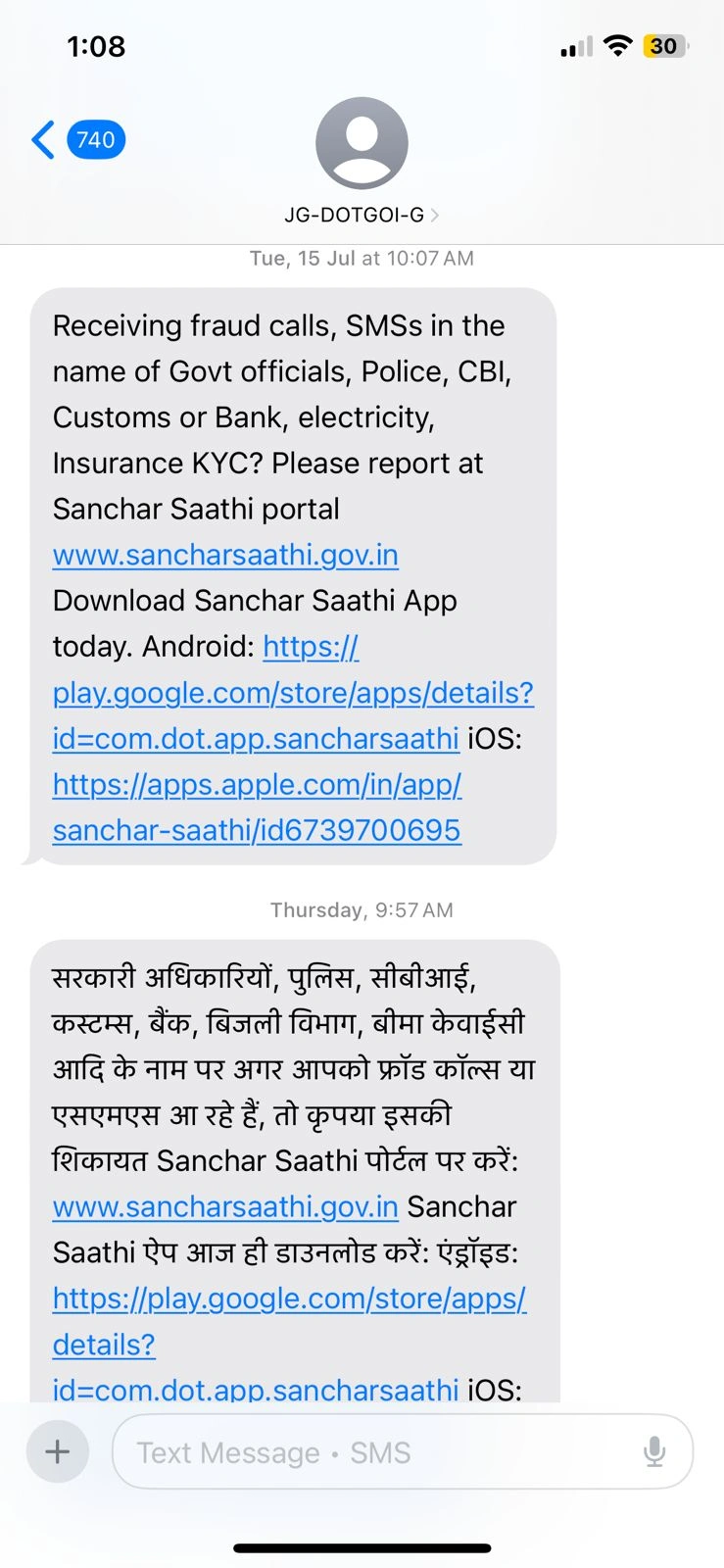
2. Government SMS (G)
Government-based text messages include reminders about a scheme, service, account-related updates, or alerts about changes in service a client is subscribing to. These service-related messages, unlike promotional messages, are not intended to the same time limitations and might be sent anytime without considering working hours.
Purpose: The messages shared by trusted & verified government departments or ministers, the text important public service details or national updates.
Trusted Source: These formats are non-commercial and often cannot be blocked.
Common Use Cases:
- COVID-19 vaccination updates
- Election updates
- Public policy awareness campaigns
Good to Know: Such formats are among the most reliable sources of notifications during emergencies or major national activities.
Sender ID Example: JP-DOTGOI-G
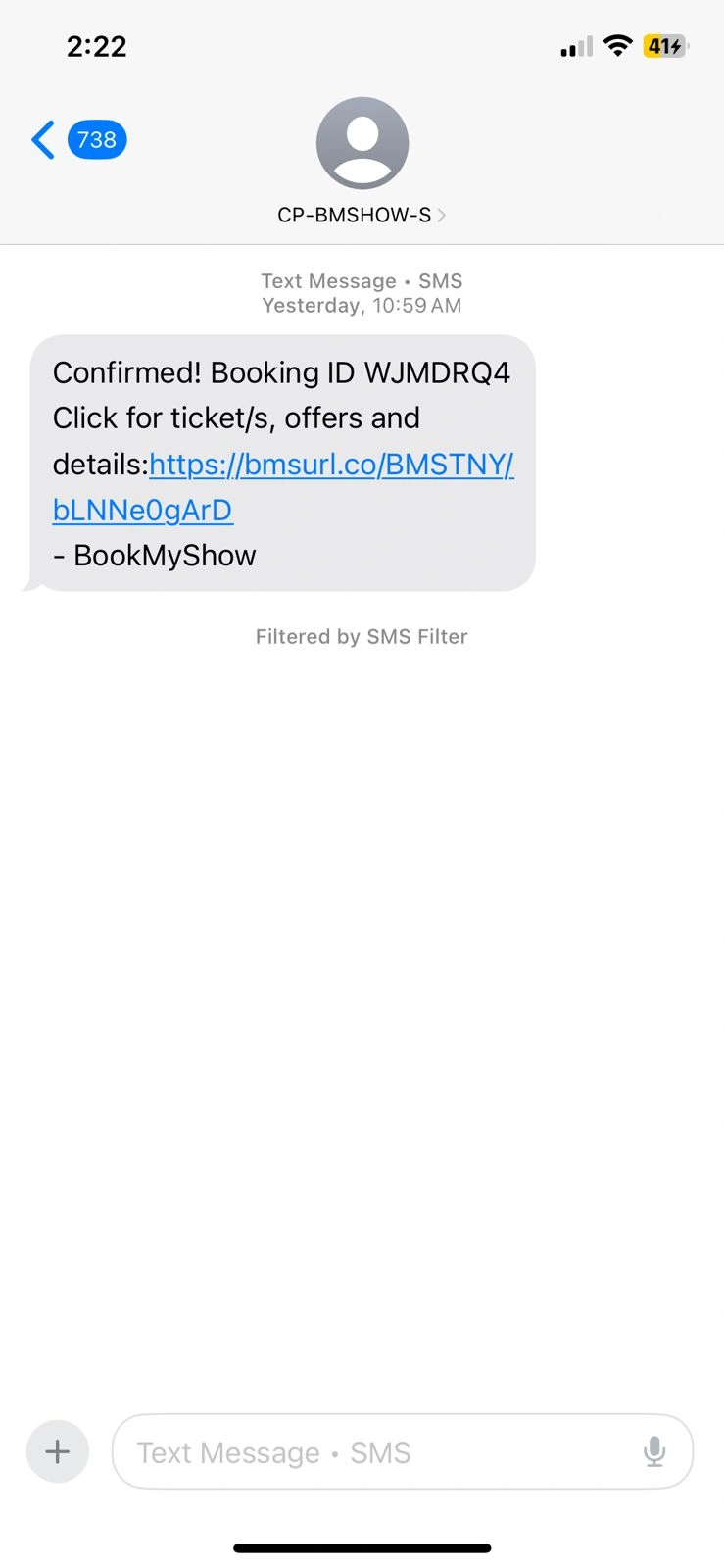
3. Service SMS (S)
Serviceable messages can involve sending reminders for a service, account-related updates, or alerts about a service change a customer is subscribed to. These service-related messages, unlike promotional messages, are not targeted to the same time boundaries and can be shared anytime.
Purpose: The formats are informational or service-related messages sent to users, regardless of whether they are subscribed or not.
Audience: Sent to both registered and unregistered users.
Common Use Cases:
- Doctor appointment reminders
- Subscription renewal notices
- Delivery or status notifications from apps like Swiggy or Nykaa.
Note: This kind of text is often helpful and not tagged spam, as they are connected to a service you’ve engaged with.
Sender ID Example: CP-BMSHOW-S
4. Transactional SMS (T)
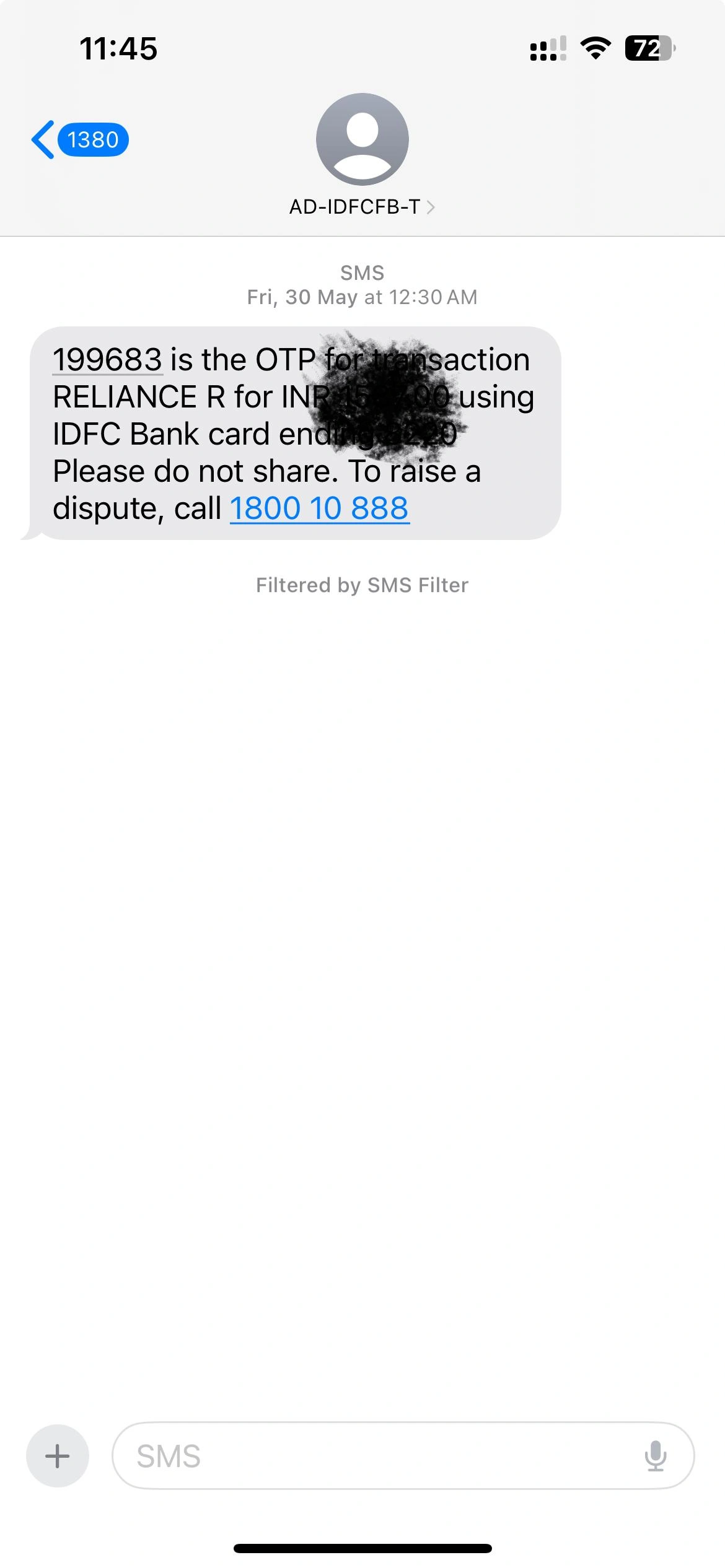
Transactional message formats are considered to be sent anytime, even outside of working hours, for marketing purposes. These contain content regarding your transactions made that clients wish to receive immediately.
Purpose: Such messages are important and time-sensitive messages shared by banks, financial institutions, and e-commerce channels.
User Scope: Only sent to registered users who have subscribed for a service or transaction.
Delivery Priority: Delivered 24×7, regardless of DND settings.
- Common Use Cases:
OTPs (One-Time Passwords) for logins or payments - Bank transaction alerts
- Order confirmations and invoices
Important: Ensure to check the sender ID while receiving an OTP or financial alert. It should match the official name of your service provider.
Sender ID Example: AD-IDFCFB-T
Understanding the Prefixes & Suffixes
What does prefix mean?
Each sender ID contains a two-letter prefix, like JD, VM, AD, or BP. It’s called the header code and follows the format:
- First Letter: Shows the telecom operator
- Second Letter: Shows the telecom circle (region/state)
For example:
- VM = Vodafone operator in Mumbai circle
- JD = Jio operator in Rajasthan circle
- BP = BSNL operator in Punjab circle
- IM = Idea operator in Madhya Pradesh circle
These formats of prefixes are an aspect of TRAI’s Distributed Ledger Technology (DLT) to ensure transparency and traceability in SMS conversations.
Why Does It Matter?
Identifying and understanding the Sender IDs helps you:
- Know whether a message is verified or suspicious
- Prevent clicking on links from unverified sources
- Know if you’re getting messages from a registered company
- Report spam or phishing attempts more properly
What do suffixes mean?
While sending text messages, especially via bulk SMS senders, you can see suffixes like ‘-P’, ‘-T’, ‘-S’, and ‘-G’ at the end of messages. These are part of the regulatory framework set by TRAI to classify the content and goal.
For example:
-P = Promotional / Service Explicit messages to promote businesses
-S = Service Implicit messages which do not directly promote the product but show service-related messages.
-T = Transactional messages like OTP, order confirmations, account balance updates, and shipping updates.
-G = Government-related messages like emergency alerts, government service updates, and other official announcements for public awareness.
Why Does It Matter?
The suffixes play an important role in managing an efficient and well-regulated SMS ecosystem across India. This is why suffixes matter:
Regulatory compliance: The regulations of TRAI lower the impact of unverified commercial communication and ensure that users are not troubled with irrelevant or unsolicited messages. Using suffixes, businesses can ensure messages are divided correctly as per the TRAI, which helps to manage delivery timing, content, and type of message sent.
Message filtering: The operators use suffixes to filter and differentiate SMS messages. The classification makes sure that content is sent following the rules. The filtering helps to ensure that the receiver is not jumbled with non-essential messages outside of acceptable timeframes.
Transparency for clients: Suffix usages offer transparency to clients for the nature of the message they’re getting. It helps to know whether they’re getting an important transactional alert, a promotional deal, or a service reminder. It reduces the chances of irrelevant or spam messages.
How to Stay Safe from SMS Scams?
The increase in mobile communication, SMS fraud have become growingly common. Fraudsters usually identify themselves as banks, government agencies, or well-known companies to trick the customers into tapping malicious links or sharing personal details.
This is how simple yet straightforward way to secure yourself:
1. Do Not Click on Unknown Links
Do not click on links in messages from unknown or unverified senders. Fraud messages generally include shortened URLs or links that direct to fake websites designed to retrieve your personal information, like login credentials and transactional details.
Tip: If a message requests you to act instantly (like “Your account will be blocked!”), Take time to verify before replying —it’s often a fraud.
2. Verify the Sender ID and Suffix
Do not forget to check Sender ID and its prefix or suffix (P, G, S, or T).
- Official businesses and services use alphanumeric IDs such as JP-DOTKEY-P or IM-ZOMATO-S.
- Scammers may use random numbers or misspelt IDs to copy real brands.
Tip: If a bank message doesn’t have a similar sender ID you’re known with, don’t open it.
3. Report Spam Messages
If you got a message from an unknown sender or a suspicious source, report it to:
- Report it to 1909 (TRAI’s official spam report number)
- Use your mobile provider’s spam reporting features
- Block the number using your messaging app
Reporting spam or unsolicited messages helps telecom providers to monitor and block fraud senders.
4. Enable Spam Filters or DND Services
The features available on your phone or messaging app to automatically block spam.
- Apps like Messages by Google on Android include spam detection.
- Apps like Filter Unknown Senders in iPhone Settings.
- Activate Do Not Disturb (DND) with your telecom provider to block marketing messages altogether.
Bonus: Few telecom providers in India allow you to activate DND by sending an SMS to 1909 or via their app.
Following the rules and guidelines, you can protect yourself from some SMS-based scams and phishing activities. Stay alert and follow the safety tips. Verify before you reply when you’re in doubt; don’t engage.
Conclusion
Knowing how to distinguish between SMS types is an easy but effective strategy to be safe against scammers and keep control over your mobile communication. Learning to read Sender IDs and observing the suffixes that are used, such as -P, -G, -S, and -T, will enable a person to know at a glance whether or not the message is promotional, government-issued, service-related, or transactional.
Through these laws, businesses are able to send messages that are acceptable in law, and consumers gain the advantage of fewer spam messages and messages that are relevant. The knowledge of these suffixes is a vital element in the use of the SMS environment by businesses and consumers who have to connect effectively and actively in an environmentally acceptable way in the SMS system.
Frequently Asked Questions
OTP Messages are often service messages, which are safe to open if you've requested them. However, if you get an OTP without initiating a login, it means: scammer trying to log in, or phishing attempt. Remember, never share your OTP with anyone else.
Not always, but you must be careful. Verified services use registered alphanumeric sender IDs. But messages from Random numbers - mainly with urgent language or unknown links - must be acted on with suspicion.
You can activate the DND (Do not Disturb) service via your mobile operator. The blocks should promote messages while enabling critical alerts like OTPs and transactional updates.
Yes, messages with suffixes like -G in the sender ID, for example JP-DOTGOI-G, are from trusted government sources and believed safe and informative.
Do not tap any links or reply with personal details. Report the message by sending it to 1909 (TRAI’s spam report number). Block the sender and activate your phone’s spam filter



 within 24
Hrs +
60
Days Free API Panel
within 24
Hrs +
60
Days Free API PanelRecent Posts