

 within 24
Hrs +
60
Days Free API Panel
within 24
Hrs +
60
Days Free API Panel
How to Use WhatsApp Business API for Logistics and Supply Chain
 3 minutes read
Last Updated :
September 25, 2026
Too Long? Read This First
- WhatsApp Business API for Logistics and Supply Chain is a messaging solution that connects a company’s delivery, tracking, and inventory system directly to WhatsApp to automate communication at scale.
- It reduces “Where is my order?” (WISMO) queries, lowers missed deliveries, offers 24/7 customer support via an AI Chatbot, and keeps suppliers, carriers, and warehouses in sync.
- Key use cases include automated live tracking, one-tap delivery rescheduling, COD & Address verification, delivery OTPs, digital proof of delivery, and much more.
- Getting started includes steps like connecting with a Meta-verified WhatsApp API provider like GetItSMS, completing business verification, connecting your logistics tools, setting up automation, and tracking key metrics like read rate or delivery.
- For an easy way in, you can connect with an official WhatsApp API provider like GetItSMS that comes with a ready-to-use dashboard, no-code chatbot builder, bulk broadcasting, and automation that help you go live without any tech headaches.
chat_bubble
Want To Send Bulk SMS?
If yes, then test our service for FREE.
Want To Send WhatsApp Msg?
If yes, then test our service for FREE.
code
Get a Free Trial of WhatsApp API
WhatsApp Business API for Logistics and Supply Chain is quickly becoming a missing piece that keeps customers, delivery agents, and supply chain partners connected. Think about it. A customer places an order and then opens tracking pages multiple times a day to see where it is.
And when they get no update, they call the support team to ask the same question every logistics team dreads: “Where is my order?” Such WISMO eats up hours of support team time.
Missed deliveries make it worse and drive up costs. At the same time, supply chain partners need instant communication with customers, suppliers, and delivery partners. That’s where WhatsApp Business API for logistics and supply chain comes in.
It connects WhatsApp directly to your existing logistics, CRM, ERP, and delivery system to let businesses send automated shipment updates, delivery alerts, tracking links, and more. In this guide, we will cover how to use the WhatsApp API for logistics and supply chain, how to set it up, and ready-to-use templates.
What Is WhatsApp Business API for Logistics and Supply Chain?
WhatsApp Business API for Logistics and Supply Chain is a messaging solution that connects a company’s delivery, tracking, and inventory system directly to WhatsApp to automate communication at scale.
Instead of manually typing each update, the API connects directly with CRM, ERP, order management, and other logistics systems to send messages automatically based on real-time events. It generally includes when an order gets packed, dispatched, or goes out for delivery. Using the Meta WhatsApp API, logistics companies can:
- Send automated order and shipment confirmations.
- Share real-time tracking links and delivery updates.
- Notify customers about out-for-delivery, delays, or failed deliveries.
- Manage NDR (Non-Delivery Report) and delivery rescheduling.
- Send delivery OTPs and proof-of-delivery notifications.
- Answer common shipment questions via WhatsApp AI chatbot.
- Connect customers with support agents through a shared inbox.
- Communicate with suppliers, warehouses, carriers, and delivery partners.
In short, it acts as a communication layer between logistics systems and the people involved in the delivery process. No manual typing or hiring extra staff is needed.
Key Benefits of WhatsApp API for Logistics and Supply Chain
Logistics businesses highly depend on timely communication at each stage of delivery. Here are the key benefits of WhatsApp Business API for logistics and supply chain management:
- Reduce “Where is My Order?” Queries: Most WISMO calls happen when customers have no other way to check their shipment updates. Businesses can send automated WhatsApp updates with tracking links to keep customers well-updated regarding their orders.
- Rich Media Sharing: WhatsApp API lets logistics teams share documents, invoices, locations, and delivery photos right inside the WhatsApp chat window.
- 24/7 Customer Support: Logistics firms can even deploy a WhatsApp AI chatbot to offer around-the-clock customer support, share tracking information, and guide customers through common requests. It can even transfer complex queries to a human agent when needed.
- Improve Supply Chain Visibility: WhatsApp API enables teams to stay connected across the supply chain by sending supplier alerts when stock needs attention, inventory notifications, and warehouse updates. It improves coordination between suppliers, carriers, and logistics teams.
- Reduce missed deliveries: Missed deliveries result in extra delivery attempts and higher operational costs. Brands can send pre-delivery alerts on WhatsApp with a quick reply button to confirm availability.
For courier-specific workflows, see WhatsApp Business API for Courier Services.
WhatsApp Business API Use Cases for Logistics and Supply Chain
1. Automated live tracking
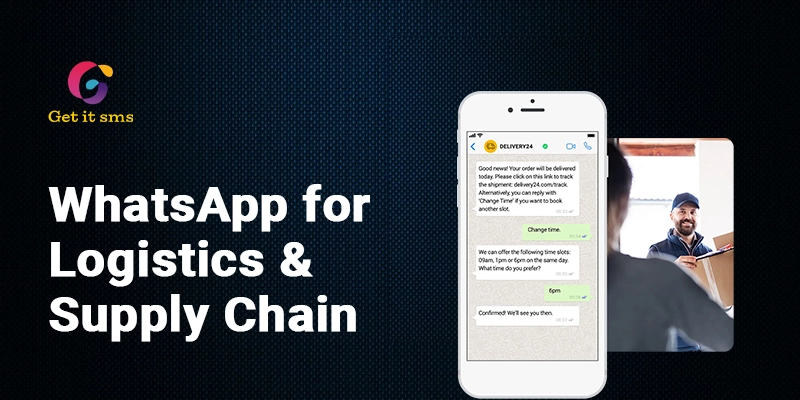
Keep your customers updated on their orders. Send automated real-time alerts at each stage when a package is dispatched, in transit, or out for delivery, with a live tracking link.
Result: Fewer WISMO queries and a better customer experience because they know exactly what’s happening.
2. Interactive Delivery Rescheduling
Sometimes customers are not available when a delivery is scheduled. Create and send interactive WhatsApp API messages with a call-to-action button to enable customers to confirm availability or reschedule delivery with just a tap.
Results: More successful deliveries and fewer repeat trips.
3. COD and Address Verification
In markets where cash-on-delivery is common, a quick WhatsApp message helps businesses verify orders and correct any address errors before the package leaves the warehouse.
Results: Fewer failed COD orders and lower return-to-origin costs.
4. Order Confirmation
Businesses can send an instant order confirmation message with order details the moment a customer places the order.
Result: Real-time updates keep customers in the loop and reduce “where’s my order?” calls.
5. Instant Digital Proof of Delivery
Offer instant reassurance by sending WhatsApp messages with photos of the delivered package and a digital signature to the sender and receiver for instant reassurance.
Result: It reduces “I never received it” delivery disputes and improves case closures.
6. Delivery OTP Verification
Businesses can even send a one-time password (OTP) directly on WhatsApp that the customer must share with the delivery agent for secure order delivery.
Results: It adds an extra layer of verification and helps prevent delivery disputes.
7. Inventory and Milestone Alerts
With WhatsApp marketing automation, warehouse managers can send instant alerts for low stock or when a high-value item shows a mismatch by syncing directly with an ERP or inventory management system.
Results: Fewer stockouts and instant stock error fixes to avoid order delays.
8. 24/7 Customer Support
Logistics businesses can deploy a WhatsApp chatbot to answer FAQs, share tracking information, and offer support even outside business hours. It can even hand complex queries to a human agent when needed, with full conversation history.
Result: Fewer support calls, instant responses to customer queries, and reduced workload.
9. Predictive Delay Notifications
If shipments get stuck in transit for any reason, the system automatically sends a bulk broadcast message for delay alerts to everyone affected downstream. It helps customers and partners instantly know the reason behind the delay.
Result: Reduce complaint calls and improve customer trust during the delays.
10. Return Pickup Notification
Businesses can even send automated messages to customers about their return order pickup date. It keeps them informed about when they have to keep the item ready.
Results: Fewer missed return pickups and smoother reverse logistics.
11. Driver Dispatch and Fleet Communication
Dispatchers can use the WhatsApp API to send route instructions, pickup slots, and delivery manifests directly to drivers’ WhatsApp. This keeps drivers updated in real time and eliminates the need to download any separate fleet management app.
Result: Fewer missed pickups and smoother delivery routes.
12. B2B Procurement and Dealer Communication
Manufacturers can send bulk WhatsApp messages about stock availability to hundreds of dealers at once. They can even use in-chat payments to confirm and pay for orders within WhatsApp.
Results: Faster restocking decisions and dealer response time.
Ready-to-use WhatsApp Message Templates for Logistics and Supply Chain
Here are some of the ready-to-use templates for logistics and supply chain:
| Scenario | Ready-to-Use Template Message | When It’s Sent |
| Order Confirmation | “Hi [Customer Name], your order #[Order ID] has been confirmed! We will notify you once it’s ready to dispatch. Thank you for shopping with us.” | Right after the order is placed |
| Dispatch Alert | “Good news, [Customer Name]! Your order #[Order ID] has been dispatched and is on its way. Expected delivery: [Date]. Tap here to track shipping [Link].” | Once the package leaves the warehouse |
| Out for Delivery | “Your order #[Order ID] is out for delivery today between [Time Window]. Reply YES to confirm you’ll be available or Reschedule if not.” | On the delivery day |
| Delivery Delayed | “We’re sorry, [Customer Name]. Your order #[Order ID] is delayed due to [Reason]. New expected delivery: [Date].” | When a delay happens |
| Reschedule Request | “Not available today? Reply with a preferred date and time, and we’ll reschedule your delivery for #[Order ID].” | If the customer can’t accept the delivery |
| Delivery OTP | “Your delivery PIN for order #[Order ID] is [OTP]. Share this only with the delivery agent at handover.” | Just before the driver arrives |
| Delivered Confirmation | “Your order #[Order ID] has been delivered. Thanks for shopping with us! Rate your experience: [Link].” | Right after delivery is completed |
| Return Initiated | “Your return request for order #[Order ID] is confirmed. Download your return label here: [Link].” | When a customer starts a return |
How to Get Started with WhatsApp Business API for Logistics & Supply Chain?
Getting started with WhatsApp API is pretty simple. Below are the steps that you need to follow:
- Pick a Meta-verified provider: Choose an official WhatsApp Business platform like GetItSMS to get instant access to the WhatsApp API with a ready-to-use dashboard.
- Set Up Your WhatsApp Business Account: Connect your business number and complete Meta Business verification by submitting the required documents and details.
- Connect WhatsApp with Your Logistics Software: Link your WhatsApp with your existing CRM system and tools like ERP, WMS, or order management tools to create a smoother communication workflow.
- Set up automation: Build simple workflows to trigger messages automatically when order status changes.
- Deploy AI Chatbot: Deploy a WhatsApp chatbot without writing a single line of code via GetItSMS to deliver instant responses to FAQs and route complex queries to a human agent.
- Track Performance: Monitor key metrics like message delivery rate, read rate, response time, and number of support conversations to know what’s working for you and what’s not.
Conclusion
WhatsApp Business API for Logistics and Supply Chain is not just another messaging tool. It is missing communication layers that keep customers, drivers, warehouses, and suppliers connected. The platform eliminates the need for support teams answering the same WISMO questions on repeat and reduces missed deliveries. From automated order confirmations, shipment tracking, and delivery alerts to NDR notifications, logistics businesses can automate all the important updates at each stage of the delivery journey.
The key is to build useful workflows, use approved message templates, and track key metrics to know what’s working and what’s not. It helps logistics companies improve customer communication without adding operational overhead or extra staff members. If you want to bring this into your logistics and supply chain management, GetItSMS helps you get started. Being an official WhatsApp Business API provider, the platform offers AI chatbots, bulk broadcasting, and WhatsApp automation without any technical or financial hassle.
Frequently Asked Questions
There is no fixed cost. The WhatsApp Business API pricing depends on Meta’s messaging rates based on the type of message you send and the recipient’s country. And your chosen provider platform fees.
Yes, Businesses can send a tracking link in their message to let customers easily track their order status right inside the chat.
Yes. Platforms like GetItSMS let logistics brands easily integrate WhatsApp with existing CRM systems, ERPs, and other order management tools to create smoother communication workflows.
Getting WhatsApp Business API approval usually takes up to 3-7 working days. It usually depends on the speed of your Meta Business Verification and display name approval.
The best platform depends on your business needs, goals, and budget. However, GetItSMS offers instant access to the WhatsApp API along with features like AI chatbots, bulk broadcasting, a shared team inbox, and automation workflows without any technical know-how.
Get your business on WhatsApp with GatitSMS
Try for freeRecent Posts