

 within 24
Hrs +
60
Days Free API Panel
within 24
Hrs +
60
Days Free API Panel
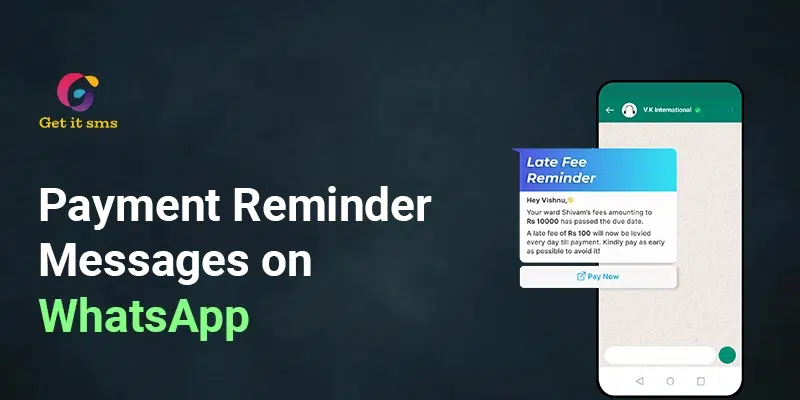
Payment Reminder Messages on WhatsApp – How to Send Guide 2026
 4 minutes read
Last Updated :
August 21, 2026
Too Long? Read This First
- Sending payment reminders on WhatsApp is the most effective way to send reminders, follow up on dues, and improve payment collection.
- With a 98% open rate and most of the messages getting read within 3 minutes, payment reminders sent via WhatsApp are more likely to get read and acted on in comparison to SMS or email.
- Use the official WhatsApp Business solution like GetItSMS to send payment reminders with Meta-approved templates to opt-in customers.
- Follow the three-step reminder sequence, including 3 days before the due date, on the due date, and firm follow-up if overdue.
- Automate your entire process with a WhatsApp Business API provider like GetItSMS to save time and improve collections.
chat_bubble
Want To Send Bulk SMS?
If yes, then test our service for FREE.
Want To Send WhatsApp Msg?
If yes, then test our service for FREE.
code
Get a Free Trial of WhatsApp API
Chasing unpaid invoices is one of the most frustrating parts of running a business. And learning how to send payment reminder messages on WhatsApp can fix that.
You send the invoice, follow up by email, and wait. Days become weeks, and you still haven’t got your money. Sound familiar? You’re not alone. Around 81% business says that overdue payments have gotten worse over the last several years.
That’s exactly where WhatsApp flips the script. With an open rate of 98% and 80% of messages read within 3 minutes, it ensures the reminders you send get actually read and acted upon by customers faster than email or SMS. It boosts on-time payments and eliminates the need to chase customers manually.
In this guide, you will learn how to send a payment reminder on WhatsApp, get some ready-to-use templates, and how to automate the entire process.
What are WhatsApp Payment Reminder Messages?
A WhatsApp payment reminder message is a direct message sent to a customer to remind them about an upcoming or overdue invoice, EMI, or outstanding bill via WhatsApp. It helps businesses reduce late payments, boost cash flow, and maintain smoother customer communication within an app that their customer already use.
These messages can be sent manually or automatically via WhatsApp Business API, making it a good option for companies handling a large volume of transactions. Payment reminder messages on WhatsApp generally include:
- Customer name and invoice or order number.
- Amount due and payment due date.
- A direct payment link or bank/UPI details
- Call-to-action button like “Pay Now”
- Late fee warning for overdue reminders (optional)
Unlike emails that sit unread for days, WhatsApp reminders show up where people are already and help businesses get paid faster.
Why Use WhatsApp for Payment Reminders over Email or SMS?
While sending payment reminders, the channel you choose matters just as much as the messages themselves. Here’s what makes WhatsApp stand out for payment notifications:
| Metric | SMS | ||
| Average Open Rate | 98% | 20–25% | 90% |
| Average Response Time | Minutes | Hours to Days | Minutes to Hours |
| Supports Payment Links/Buttons | Yes | Yes (less clickable) | Limited |
| Feels Personal | High | Low | Medium |
| Cost per Message (India, approx.) | ₹0.50–₹0.90 | Near-zero | ₹0.15–₹0.30 |
| Automation-Friendly | Yes (WhatsApp API tools like GetItSMS let brands automate follow-ups and reminders) | Yes | Yes |
WhatsApp wins because it is instant, personal, and supports payment links, a quick reply button, and attaching invoices. This is something that email and SMS simply can’t offer.
Things to Know Before You Start Sending WhatsApp Payment Reminders
Sending payment reminders on WhatsApp requires following some simple rules, as skipping them can get your messages blocked or reported as spam.
- Use official channels only: Do not use a personal WhatsApp number or a tool for reminders. It is against Meta policies, and your number can get banned. Make sure to use a credible WhatsApp business account.
- WhatsApp Business API is a must: If you want to send automated, scheduled, and bulk reminders, you can’t do without the WhatsApp Business API.
- Pre-approved Message templates: WhatsApp needs all outbound messages to use Meta-approved templates. That’s why you get your message template approved before launching.
- Opt-in consent: Send messages only to customers who’ve given explicit consent to receive messages from your business.
- Template Category: WhatsApp categorizes templates into three types: Utility, Marketing, and Authentication. And payment is in Utility. To prevent having your template rejected, please use the correct category.
- Timing matters: Don’t send payment reminders too early or too late in the day. Try to shoot them during business hours and space out follow-ups to avoid coming across as aggressive.
How To Send Payment Reminder Messages on WhatsApp?
Let’s have a look at how to send payment reminder messages on WhatsApp via the official WhatsApp solution, like Getgabs. Follow the detailed instructions to send WhatsApp payment reminder messages:
- Sign up or log in to the Getgabs account.
- Import your contacts in an Excel file to approve or ‘Create WhatsApp payment reminder message template’.
- Next, tap on the ‘Create Campaign’ section on the dashboard.
- Add a name to your message campaign in the name field.
- Click on the WhatsApp book option or contact list from the menu.
- Choose whether to broadcast immediately or schedule for a particular date & time.
- And then tap on ‘pre-approved template’.
- Click the ‘submit’ button to send a WhatsApp payment reminder message through Getgabs.
Hence, you are all set to notify your customers of their payments. Getgabs allows businesses to send broadcast messages or create customized WhatsApp message templates. You can also enhance your marketing strategy and customer relationships with Getgabs.
Best Time to Send Payment Reminders on WhatsApp
As mentioned earlier, timing can make or break your reminders. Sending too early makes the customer forget, and sending too late feels like a nag. The best window is 10 AM to 7 PM local time.
For better results, you can follow this simple sequence instead of sending one after the other.
| Stage | Timing | Tone |
| Upfront reminder | 3 days before the due date | Friendly and informative |
| Due-date nudge | On the due date | Polite and clear CTA |
| Overdue follow-up | 1, 3, and 7 days after the due date | Firm but respectful |
Such a sequence gives customers enough time to plan ahead, a clear nudge on the due date, and steady follow-up if they miss it without sounding harsh.
Top WhatsApp Payment Reminder Message Template Examples
Use these templates as a starting point and customize them based on your business details. Here are some of them:
1. Friendly payment reminder template
Hi [Client Name]! This is a friendly notification that you have an upcoming payment on [Date] for Invoice [#]. Visit [URL] to review or make the payment.
2. Due date payment reminder
Dear customer! Your payment for Invoice number should be made by next week. You can pay using your comfortable payment option [credit card/debit card/UPI/NEFT]. Please get in touch with us for any queries.
3. Late payment reminder
Hi [Client Name], you are two days overdue on [amount] on [due Date]. Please check the details and make the payment. Click the payment link. Ignore the message if you have already paid!
4. Late payment follow-up reminder
Hi [Client Name]. Have you made the payment? We have not seen the update on your overdue payment. This is a follow-up reminder that your payment has not been made on [Invoice] [due Date]. If still not paid, late charges will be applicable.
5. Incentivized payment reminder
Hey! We have an exclusive offer for you! Pay before the due date and get 10% off your next payment. Click the link to pay and take advantage of this offer!
6. Final notice payment reminder
Hi [customer name]. This is a final reminder of your due payment of [Invoice]. If you do not pay it today, we will take legal action against you. Kindly avoid the message if you have already paid!
Industries Using WhatsApp Payment Reminder Messages
Companies of all sizes and types are using WhatsApp payment reminders today. Here’s how different industries can use it:
1. Healthcare industry
In Healthcare, billing can be confusing sometimes. WhatsApp reminders help patients know what they owe and when to pay.
With WhatsApp, healthcare providers can:
- Send billing reminders for treatments, insurance co-pays, and consultations.
- Help patients clear dues instantly.
- Keep the clinic billing cycle running smoothly.
Example:
“Hello, Sana! Your upcoming hospital visit with [the doctor] will require you to pay the [amount]. You can click on [link] or use a credit or debit card. You can also pay after the visit.”
2. Home Services
Landscapers, roofers, cleaners, and other home service workers generally don’t have a billing system on-site during the job. WhatsApp lets them share invoices using the API and remind clients about their payments.
Example:
“Dear customer! Please check the attached payment invoice for your home cleaning service. You can pay online or at the address on the Invoice.”
3. Financial services
Bankers. Lenders and insurers can use the payment reminder message service to assure their clients that they know about their bills and avoid missed payments. There are several types of financial services companies that can notify their customers:
- Upcoming credit card payments
- Car loan payments
- Mortgage payments
- Insurance payments
- Service fees
For example:
Dear customer, your credit card payment is due for [amount]. Please make the payment to avoid late charges. Make the payment by logging into your account.
4. Subscription-based services
A lot of companies use subscription-based payment methods. This comprises:
- Services with memberships (gyms, regular food plans, etc.)
- SaaS enterprises
- Disseminating and airing
- advertising firms
- Utility firms
If a customer’s recurring payment varies monthly, they may be unaware of the exact date and amount owed. WhatsApp reminders can be sent to ensure that monthly payments are understood and made on time.
For example:
Hi Jehe! Your active subscription plan is going to expire next week. Please make the payment to reactivate your subscription!
How to Automate Payment Reminders on WhatsApp?
Manually tracking who’s paid, who hasn’t, and who needs follow-up with a limited customer base. But when your customer base grows, spreadsheets and manual sending can’t able to keep up.
And this is exactly where you need WhatsApp automation for payment reminders to save time and speed up payment collection. Here’s how you can do it:
- Get WhatsApp Business API Access: Sign up for an official WhatsApp Business API provider like GetItSMS to get instant access to the API and a ready-to-use dashboard.
- Create and Submit Message Templates: Create and submit your payment reminder templates to Meta for instant approval.
- Sync Your Customer Data: Seamlessly connect with your existing CRM, billing software, or payment platform to get each customer’s invoice details, due dates, and contacts automatically via GetItSMS.
- Set Up Trigger-Based Workflows: Define when reminders go out, like 3 days after the due date, on the due date, or 2 days after. GetItSMS lets you build an automated sequence without any coding skills required.
- Monitor and Optimize: Now track delivery rates, open rates, and payment conversion with GetItSMS analytics dashboards. Adjust timing and message based on data.
Platforms like GetItSMS help you go from manual to fully automated payment reminders in just a few minutes without any technical headache.
Do’s and Don’ts of WhatsApp Payment Reminders
Let’s quickly go through some dos and don’ts to ensure payment reminders are sent via WhatsApp in the right manner:
| Do | Don’t |
| Mention the amount, due date, invoice number, and payment link. | Use vague lines like “please pay soon” |
| Personalize the message with the customer’s name, invoice number, amount due, and due date. | Send messages without opt-in consent |
| Keep the message short and to the point. | Use harsh or threatening language |
| Offer a clear CTA or payment link for easier convenience | Send multiple reminders in one day |
| Test templates before sending in bulk | Send messages outside the 10 AM – 7 PM window |
Conclusion
Learning how to send a payment reminder message on WhatsApp is one of the simplest ways to fix late payments without any harsh follow-up calls or unread emails. With the right 98% open rate, clear CTA, Meta-approved templates, and the right timings, you can turn a stressful payment chasing process into friendly reminders that actually get desired results. For growing businesses, automation is essential to keep the payment process running smoothly without any manual effort.
And for that, you need access to WhatsApp Business API. With a trusted WhatsApp API provider like GetItSMS, you can access pre-approved reminder templates, automate your entire follow-up sequence, and even track responses from a single dashboard. So rather than wasting your time chasing payment, you can set up a WhatsApp payment reminder once and let it run. Connect with GetItSMS today and improve your payment process collection.
Frequently Asked Questions
Sending WhatsApp payment reminders via the regular WhatsApp Business app is free, but it lacks automation and doesn’t scale well. For broadcast and automation, you need the WhatsApp Business API, which includes Meta charges per conversation and fees charged by your provider.
WhatsApp payment reminder notifications help businesses accelerate collection, improve conversion, and offer a frictionless payment experience for customers.
Yes. Businesses can easily customize the payment reminder message by adding invoice numbers, a direct payment link, and other things as per their needs.
Yes. Using a WhatsApp Business API provider like GetItSMS, businesses can broadcast payment reminders to hundreds of customers at once in a personalized manner using the customer's name, due amount, and invoices.
No. Your customer only needs a regular WhatsApp app installed on their phone to receive a WhatsApp payment reminder.
Get your business on WhatsApp with GatitSMS
Try for freeRecent Posts