

 within 24
Hrs +
60
Days Free API Panel
within 24
Hrs +
60
Days Free API Panel
WhatsApp Business with Multiple Users – Complete Guide
 4 minutes read
Last Updated :
September 3, 2026
Too Long? Read This First
- WhatsApp Business supports multiple users through two options: the free App (up to 5 linked devices) or the API (unlimited agents with advanced team features).
- The WhatsApp Business App works for small teams but comes with certain limitations like lack of chat assignment, routing, internal notes, and agent performance tracking.
- WhatsApp Business API removes the 5-user cap and adds a shared team inbox, chat routing, CRM integration, and analytics dashboards to manage high-volume conversations.
- Adding agents on the API takes minutes. Just set up user roles like Admin, Agent, or Supervisor, and each teammate gets instant login access.
- For growing teams needing automation, routing, and reporting, GetItSMS offers a ready-to-use WhatsApp Business API dashboard with full Meta onboarding support and instant setup.
chat_bubble
Want To Send Bulk SMS?
If yes, then test our service for FREE.
Want To Send WhatsApp Msg?
If yes, then test our service for FREE.
code
Get a Free Trial of WhatsApp API
Managing a customer conversation across a growing team with just a single WhatsApp number can be tough. Missed messages, confused agents, and zero visibility add up instantly.
So is it really possible for the whole team to manage a WhatsApp conversation with one number? Yes, WhatsApp Business with multiple users is fully supported. There are two different ways to set it up based on your team size.
The WhatsApp App lets you link up to 5 devices to one number for completely free. Whereas WhatsApp Business API takes it further by offering unlimited agent access to a shared team inbox with some more advanced features like chat routing, automation, and more.
But how do you know which solution is a perfect fit for your team’s specific daily workflow? In this guide, we will explore how to use WhatsApp Business with multiple users via both methods. We will also help you pick the right solution for your business with GetItSMS.
WhatsApp Business App vs API: Which One Supports Multiple Users?
WhatsApp offers two different versions for businesses: WhatsApp Business App and WhatsApp Business API. Both of them support multiple users, but in very different ways. To make it easier for you, we have compared both side-by-side:
| Feature | WhatsApp Business App | WhatsApp Business API |
| Maximum Users/Devices | Up to 5 devices (1 phone + 4 linked devices) | Unlimited users and devices |
| Chat Assignment | Not available | Assign chats to specific agents |
| Shared Team Inbox | Not available | Available |
| Chatbot Support | Not available | Available |
| CRM Integration | Not available | Available |
| Analytics & Reporting | Basic insights only | Advanced analytics and reporting |
| Message Broadcasting | Limited capabilities | Large-scale bulk messaging |
| Cost | Free | Meta conversation charges + BSP fees |
| Best For | Small businesses and teams (1–5 users) | SMBs, mid-sized businesses, and enterprises |
WhatsApp Business App for Small Teams
The WhatsApp Business App is completely free to download and is particularly built for small businesses. The version supports up to 5 devices, which include one phone and four additional devices such as tablets, a PC and a second phone.
Each linked device will access the same inbox to enable the team to respond without passing one phone around. While a free app works great for a small business, once your query volume grows, you need more than shared device access. You need control, visibility, and automation.
Best for: Teams with 1 to 5 members managing low to moderate message volume.
WhatsApp Business API for Growing Teams
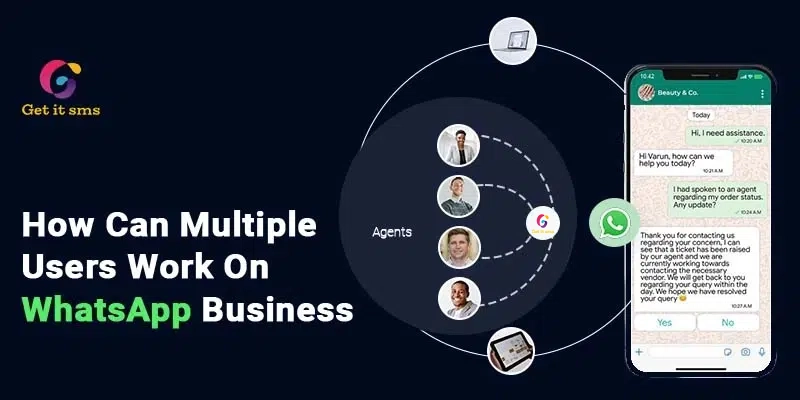
The WhatsApp Business API is also called the WhatsApp Business platform. It is mainly built for a growing team managing massive customer queries. Unlike the free version, it supports unlimited agents, a shared team inbox, chat routing, broadcast messages, CRM integration, chatbot automation, and advanced analytics to improve response time and scale efficiently.
Since the API has no built-in interface, to access it, you need an official WhatsApp Business Solution provider like GetItSMS. The platform offers you a ready-to-use dashboard with zero coding skills required.
Best for: SMBs, mid-size businesses, and enterprises handling high message volumes.
How to Add Multiple Users on WhatsApp Business App (Step-by-Step)
Adding multiple users to the WhatsApp Business App is a very simple yet instant process. It enables you to link up to 5 devices to one WhatsApp Business number with one primary phone and four other devices.
Here’s how you can do it on both Android and iPhone:
For Android:
- Open the WhatsApp Business App on your primary phone.
- Click the three vertical dots in the top right corner.
- Now select Linked devices.
- Tap Link a Device and unlock the phone with your PIN or biometric authentication.
- Scan the QR code displayed on the device you want to link.
That’s all. Now your new devices can have access to your WhatsApp Business inbox.
For iPhone
- Log in to your WhatsApp Business App on your primary phone.
- Tap on Settings in the bottom right corner.
- Click on a Link to a Device.
- Unlock your phone using Face ID, Touch ID, or your PIN.
- Now simply scan the QR code displayed on the device you want to link.
That’s it. Your linked device can now easily access your inbox independently.
The best part? Your linked device works independently. It means your primary phone does not need to stay online for other devices to keep working.
Limitations of the WhatsApp Business App for Multiple Users
The WhatsApp Business App works great as a starting point for small teams. But with a growing business, these limitations will slow you down instantly:
- No Chat Assignment: There is no way to assign a conversation to a specific agent. It means any linked device can see and reply to any message, which can create confusion sometimes.
- No Messaging Routing: Agents can reply to the same customer at the same time without knowing it. It can lead to confusion and duplicate responses to your customer.
- No Role-Based Access Controls: Everyone who has access to a linked device sees the same inbox. It means there is no way to restrict permissions, hide sensitive data, or set access based on role.
- No Internal Communication: Team members cannot even leave internal notes or comments to share content like previous orders or complaints without the customer seeing it.
- No Agent Performance Monitoring: You cannot track the response time, individual agent activity, or resolution rate.
- No Chatbot Support: It does not support automated responses or chatbot flows. Each message requires a human agent to respond, even the repetitive ones.
- Device limit with missing CRM integration: After your team grows beyond 5 members, there is no workaround within the app. Plus, it does not natively integrate with your CRM system, which forces customers to repeat themselves each time they reach out.
The WhatsApp Business App works great for a micro team handling limited customer queries. But the moment you need accountability, routing, or scaling, you need to switch to the WhatsApp Business API.
How to Use WhatsApp Business API for Multiple Users?
Another option to add multiple users to WhatsApp Business is to utilize the WhatsApp Business API. It is a Meta solution for businesses that need much more than what a basic app offers. Unlike the app, it has no ready-to-use interface and requires an official WhatsApp Business Solution Provider like Getgabs or GetItSMS.
These platforms give you access to a ready-to-use dashboard, multi-agent inbox, and automation tools without any technical headache.
Here’s how you can get the WhatsApp Business API via Getgabs:
- Sign up or log in to the Getgabs panel.
- Go to manual onboarding on the left side panel.
- To build an app, a Facebook developer account is used.
- Link a non-WhatsApp or new WhatsApp number to the API setup.
- Upload the required documents, like GST and MSME, to verify your account on Meta.
- Add required details, including app ID, phone number, and display in the Getgabs app.
Once your account gets approved by Meta, your WhatsApp API account is ready for multi-agent use. Wait. We are missing the core part of adding multiple users and agents.
How to Add Multiple Users and Agents in Getgabs?
Adding agents to your WhatsApp Business API account takes less than two minutes. Just follow a few simple steps:
- Log in to your Getgabs dashboard
- Go to Settings → User Management
- Click on the Add New button.
- Fill in the user details like full name, email, WhatsApp number, username, and password
- Set the user role like Admin, Agent, or Supervisor
- Click Sign Up to confirm
The agents receive login credentials and can begin managing conversations instantly.
Benefits of Using WhatsApp Business API for Multiple Users
Here are the key benefits your team gets while using WhatsApp Business API for multiple users:
- No Agent Limit: Add unlimited agents to your team. This version has no device cap and enables your whole team to be on the same page.
- Smarter Conversation Management: Automatically assign the chat to the right agent or department. It eliminates the risk of double replies and ensures no messages go missed.
- 24/7 Automated Support: Deploy a WhatsApp AI chatbot to handle routine queries like FAQs, order tracking, appointment booking, and more, even outside business hours.
- Full Customer Context for Every Agent: Seamlessly integrate with your existing CRM or third-party tools to enable agents to access the complete customer history before they respond.
- Detailed Analytics Dashboards: Monitor agent activity, average response time, and resolution rate from a single dashboard to manage your team’s performance.
- Shared Team Inbox: Enable multiple team members to manage all incoming messages from a single unified inbox with role-based access to restrict visibility and data access based on employees’ roles.
- Broadcast Messaging at Scale: Send bulk WhatsApp promotional messages, updates, and reminders to thousands of customers at once.
Which WhatsApp Business for Multiple Users is Right for You?
Still confused about which option best fits your business? Let’s make it easier for you to get to the final decision:
Choose the WhatsApp Business App if:
- Your team has 5 or fewer members.
- Your business handles a low to moderate number of customer messages daily.
- Need free and basic shared access without any setup.
- You are just starting with WhatsApp marketing for your business.
Choose the WhatsApp Business API with GetItSMS if:
- Your team has more than 5 agents handling high-volume customer conversations.
- You need to assign, route, or track chats by agents or departments.
- Require WhatsApp chatbot to handle routine queries 24/7.
- Want CRM integration to get the complete customer history before responding.
- You are growing brands with the needs of automation, broadcasting, and a shared team inbox.
The WhatsApp App is a great starting point for a small business. But if WhatsApp is your main support, sales, and marketing channel, going with WhatsApp Business API for multiple users is the right move.
If you choose the WhatsApp Business API option, it is vital to work with a verified Meta WhatsApp Business API provider like GetItSMS. The platform will handle all your API setup and onboarding, and ensure your business stays compliant with Meta’s policies.
In the end, your choice between them mainly depends on your team size, message volume, and how much control you need.
Conclusion
WhatsApp Business Multiple Users support is not just an option but a necessity for growing teams. It acts as a foundation for instant and enhanced customer communication. If your team is small and requires basic shared access, you can use the WhatsApp Business App. You can start up for free with a link to up to 5 devices. But if you are scaling, it’s better to opt for the WhatsApp Business API for multiple users to enable your team to access features like automation, chat routing, a shared team inbox with role-based access, and an analytical dashboard to manage high-volume customer chat without dropping the ball.
However, it is essential to know the business size and requirements while selecting between a WhatsApp business app or API. If your choice is WhatsApp API, connect with GetItSMS or getgabs today for instant access to the API. From Meta approval to agent onboarding, the platform will handle everything for you. Ready to scale your teams’ outreach with just a single number? The right tool is just a click away.
Frequently Asked Questions
Yes. In the WhatsApp Business App, all linked devices can see the same inbox. But in the API, you can assign a conversation to a specific agent or department to enable handling a chat.
Yes, the WhatsApp Business App supports up to 5 devices. It includes one primary phone and four additional devices. Adding three devices is well within the limit for both the WhatsApp Business App and API.
No. To access the WhatsApp Business API, you need to pay Meta charges per conversation based on message type and category, and also a platform fee of your BSP.
On the WhatsApp App, the chat just waits with no alerts. While on the API, supervisors can easily spot unanswered chats on the live dashboard and reassign them instantly without leaving any messages unattended.
On the WhatsApp Business App, you can not assign a chat to a specific agent. In WhatsApp Business API, platforms like GetItSMS or Getgabs enable you to easily assign, reassign, route, and track conversations by agent or department from a single dashboard.
Get your business on WhatsApp with GatitSMS
Try for freeRecent Posts