

 within 24
Hrs +
60
Days Free API Panel
within 24
Hrs +
60
Days Free API Panel
How to Use WhatsApp Business API for Salons?
 4 minutes read
Last Updated :
September 25, 2026
Too Long? Read This First
- WhatsApp Business API helps salons and spas organize client interaction and cut manual workload.
- Automation and AI chatbots handle bookings, reminders, feedback requests, and FAQs, reducing no-shows by 30-50%
- Key use cases include AI chatbot booking, post-service feedback requests, product follow-ups, birthday and loyalty offers, Click-to-WhatsApp ads, QR code walk-in engagement, and service catalogue sharing
- Beauty brands can get started by just verifying their business, linking a dedicated number, and connecting the API with a provider like GetItSMS.
- With Official Meta WhatsApp Business API providers like GetItSMS, salons can automate bookings, broadcast offers, and manage every client conversation from one WhatsApp number
chat_bubble
Want To Send Bulk SMS?
If yes, then test our service for FREE.
Want To Send WhatsApp Msg?
If yes, then test our service for FREE.
code
Get a Free Trial of WhatsApp API
WhatsApp Business API for salons is becoming the real difference between a fully booked and an empty one. With the global market expected to cross $284 billion by 2026, the competition for client attention has never been tighter.
Yet most salons are still losing bookings to missed calls and forgotten follow-ups. Your front desk isn’t able to answer each call while checking in walk-in clients. Messages keep piling up.
And guess what? WhatsApp Business API for salons and spas fixes it all. It enables salons and spas to send instant booking confirmations, automatic reminders, and exclusive offers without hiring any extra staff. Industry data shows automated WhatsApp reminders alone cut no-shows by 30-50%.
This guide will cover everything about WhatsApp Business API for salons, including its benefits, use cases, ready-to-use WhatsApp template messages, and the setup process.
What is the WhatsApp Business API for Salons?
WhatsApp Business API for salons is a business messaging solution that lets beauty brands communicate with customers effectively and efficiently. Unlike the regular WhatsApp Business App, it enables salons to connect WhatsApp with their booking systems, CRMs, and automation tools. It provides you with a direct means of sending reminders, updates, promotional texts, and even booking confirmations.
With WhatsApp Business API, salons can:
- Send appointment reminders and booking confirmations automatically.
- Deploy AI chatbots for instant customer support.
- Let your whole team manage clients from a single WhatsApp number,
- Send bulk promotional messages to reach thousands of clients in a single go.
- Share photos, videos, and pricing lists within chat,
From luxury spas to nail salons, WhatsApp Business API helps reduce no-shows, simplify appointment management, and deliver a seamless customer experience.
Key Benefits of WhatsApp Marketing for Salons
Using the WhatsApp API not only makes operations easier but also keeps your beauty brands at the top of customers’ minds. Here are some of the benefits of using WhatsApp Business APi for a salon:
- Fewer No-shows: Automated reminders ensure that clients never forget about their appointments. It helps them reduce no-shows by 30-50% and fill more chairs every day.
- Instant Two-Way Communication: The platform allows clients to ask a question and get an instant reply within seconds. No waiting on hold. Just a simple back-and-forth chat.
- Automated Booking Management: Use AI-powered chatbots to answer common questions like pricing and let customers make bookings at any time of the day.
- Integration with CRM systems: Connect WhatsApp with your existing CRM or booking tool to sync client history, preferences, and appointments in one place. It simplifies appointment management and provides a more personalized experience.
- One shared inbox for your whole team: From your front desk to stylists, a unified shared team inbox enables multiple team members to manage customer interactions from a single dashboard and keep everyone on the same page.
- Cost-effective solution: Sending messages on WhatsApp costs much less than other traditional channels like email, SMS, or phone calls. It saves you money while enabling you to reach more clients in a single go.
- Global Reach and Higher Open Rate: With 3.3 billion users and an outstanding open rate of 98%, the channel allows you to engage with customers around the world and ensure each message gets opened and read.
Integrating the API into your salon business streamlines operations and enhances customer interaction.
Best WhatsApp Business API Use Cases for Beauty Salons
Leveraging the WhatsApp tool for the salon and parlor industries in various operations:
1. Automated Appointment Booking & Scheduling
Manual booking wastes time and often leads to booking errors. With WhatsApp Business APi salons can:
- Let clients book 24/7 by messaging your number
- Deploy AI chatbots to let customers check availability
- Collect preferences through WhatsApp Forms
- Send instant confirmations with date, time, and service details
Example: Client sends message “I want a haircut” → Chatbot shows open slots → Receive instant confirmation message on WhatsApp.
Result: Clients can confirm a booking within seconds without waiting for a callback, and cut missed-booking errors.
2. Appointment Reminders & No-Show Reduction
Missed appointments cost salons real revenue every week. Send automated reminders 24 hours and 2 hours before each booking. Add a quick reply to enable clients to confirm, cancel, and reschedule with a single tap.
Example: Reminder sent → client taps on the “reschedule” button → new slot gets confirmed instantly.
Result: Automated WhatsApp reminders reduce no-shows by 52% and speed up booking confirmation by 3.2 times.
3. Post-Service Feedback Requests
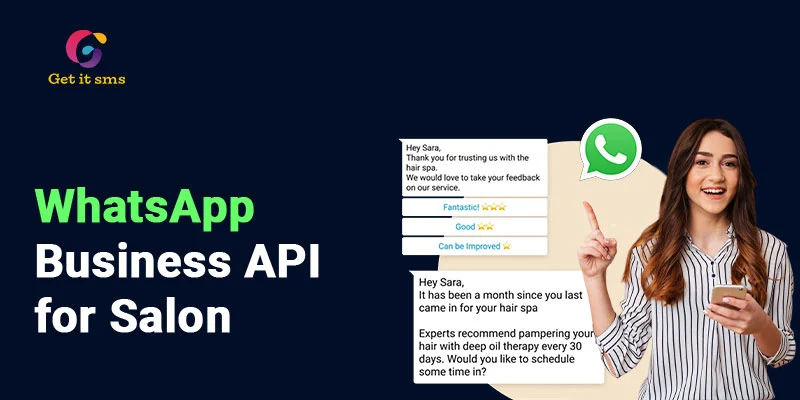
Send automated WhatsApp messages right after their visit asking about their experience. Use a quick reply button to enable user rating with one tap, like star rating, good, or need help. Happy customers can leave a Google review, and negative feedback is sent to the salon team for instant resolution or follow-up.
Example: Service completed → Feedback request sent → Customer taps star rating → Google review link is shared.
Result: Collect more reviews and improve customer satisfaction.
4. Product Recommendation Follow-Ups
Salons often miss chances to sell retail products after a service ends. Send personalized product recommendations after each appointment. You can even suggest a product based on the service received with the Buy Now or Order Now button.
Example: Clients get a colour service → Follow-up message suggests colour-protect shampoo → clients tap the link → place order via WhatsApp.
Result: Drive additional product sales, improve post-service care, and boost customer lifetime value.
5. Birthday & Loyalty Offers
Clients remember a salon or spa that remembers them. Send automated birthday or anniversary wishes with special offers or a free add-on. Reward milestones like the 5th or 10th visit with a loyalty offer.
Example: Customer’s birthday arrives → You send “Happy Birthday! Enjoy 10% off → client clicks “Book Now” → slot gets confirmed instantly.
Result: Personalized engagement boosts engagement by 72% and drives repetitive visits.
6. Click-to-WhatsApp Ads (CTWA)
Run ads on Instagram or Facebook that bring customers directly to the WhatsApp chat window the moment a customer taps on it. Instead of filling out forms, potential clients can ask questions or book right away.
Example: Client taps salon’s Instagram ad → WhatsApp chat opens automatically → Chatbot shares pricing and open slots → clients book in the same chat.
Result: Click-to-WhatsApp ads convert random browsers into leads and remove friction.
7. QR Code Walk-In Engagement
Put a custom QR code at reception, on flyers, or at the entrance to let clients scan to join the WhatsApp list without adding any phone number or filling out a form.
Example: Client scans the QR code → WhatsApp opens with a pre-filled welcome message → client is added to your contact list for future offers.
Results: Convert a one-time walker into a saved contact for future reminders, offers, and repeat bookings.
8. Service Catalogue Sharing
Enable your client to browse your complete menu of services along with prices and photos using the WhatsApp catalogue. Plus, they can ask questions or make a booking with just a single tap.
Example Workflow: Client asks, “What services do you offer?” → Catalog is sent instantly → Client taps a service → Booking flow starts.
Result: Cuts back-and-forth questions and speeds up decision-making.
WhatsApp Message Templates Examples for Salon
1. Event invite for salon
“Congratulations! We are organizing a free event where our specialist will give beauty tips and advice on how to look healthy and younger without spending a penny. Come and join us; check the event details:
Venue: {{2}}
Time: {{3}}
Participants will receive a free Hair kit. So get registered and grab the deal! Thank you.”
2. Review request for salon
“Hello [customer name], you had a hair session at our salon last week. We would be glad if you could leave a review to get the word out about your experience. We would love to serve more queens like you. Thank you!”
3. New service promo for salon
“Hey there, we are glad to inform you that we have recently added an eyebrow microblading service. If you want to try this, respond to us with this message: ‘YES’ to book your slot! And yes, we will also give a 25% discount to try this service.”
4. Limited-time offer for salon
“Hello, Diya, we are giving a SUNDAY special discount today! If you are interested in booking your appointment and trying our service, this is an excellent time to do that. Reply with ‘S,’ and we will connect you immediately to schedule an appointment. This is not a chance to miss; hurry up.”
5. Appointment reminder for salon
“Dear customer, we are notifying you that your appointment for a hair session is scheduled for tomorrow. We are glad to serve you. Please let us know if you have any questions! Thank you.”
6. Booking confirmation for the salon
“Hi Shivani, your appointment booked for Tuesday is confirmed. Inform us at the counter when you come, and we will serve you!”
7. New customers are welcome to the salon
“Hey Miya, it’s nice to greet you at our salon/parlor. Thank you for connecting with us for the service. We look forward to seeing you again.”
8. Birthday special offer for the salon
“Happy birthday, Cather. We are excited to give you a 50% discount on your birthday. Book your appointment and get the deal. Congrats, and we hope to see you soon! At your service.”
How to Set Up WhatsApp Business API?
1. Requirements to Set Up WhatsApp Business API
- WhatsApp business account: Create a WhatsApp business account, or if you already have an account, skip it.
- Phone number: You require a dedicated phone number for the API account, distinct from your phone number.
- Business verification: Complete the steps to verify your business through the Facebook Business Manager.
- API access: Apply to get access to the WhatsApp Business API. This generally includes working with a Meta WhatsApp Business provider like GetItSMS or Getgabs, who will help to set up and manage the API.
2. Steps to set up an API account
To get the official WhatsApp Business API, go through these easy steps to leverage it for your business:
- At the initial level, sign up or log in to the Getgabs panel.
- Move to manual onboarding on the left-side panel.
- To create an app, a Facebook developer account is used.
- Link a non-WhatsApp or new WhatsApp number to the API setup.
- Upload the required documents, like GST and MSME, to verify your company account on Meta. Verify that the business number will be used for the API.
- Move to the Getgabs app and add the needed details, including the app ID, phone number, and display. Once details are added, the account status will be changed to Green.
Congrats, you’re done! Start message broadcasting now to your clients.
Common WhatsApp Marketing Mistakes Salons Should Avoid
- Messaging without opt-in: Do not send unsolicited messages. Always ask for opt-ins via booking forms or using QR codes before sending out messages. Failure to do so can result in your Salon or Spa business ending up with spam and numbers blocked.
- Ignoring the 24-hour window: Meta only enables free replies within 24 hours of the client’s last message. After that, you need an approved template to send a message.
- Spamming with promotions: Sending too many promotional messages often makes customers feel annoyed and increases opt-outs. Send only relevant and well-timed messages to your targeted audience.
- Using one generic message for everyone: Sending the same broadcast to all clients won’t work. Divide your list and customize your message with the customer’s name or product/services they have used to boost engagement.
Conclusion
In conclusion, the WhatsApp Business API for salons not only helps improve services but also provides a reliable way to connect with their customers. From automated reminders that reduce no-shows to loyalty offers, the platform solves real problems that are hurting your revenue each week. With tools like WhatsApp automation, bulk broadcasting, shared team inbox, CRM integration, and AI chatbots, salons save staff hours, reduce manual booking, and create strong customer relationships.
The good news? You don’t even need to hire a big technical team or have a big budget to get started. With the right WhatsApp marketing tool and Meta approval, your salon, spa, or studio can begin sending automated reminders, booking confirmations, and offers. It’s the best time to make this switch to stop losing clients. Ready to turn your every WhatsApp message into a booked appointment? Connect with GetItSMS today to boost your salon and spa growth and ROI using the most popular messaging channel.
Frequently Asked Questions
No, Salons looking to deploy API do not need to have pure technical skills. Many reliable service providers in the market itself manage the setup and integration, making it easier for salon owners.
No. To use WhatsApp Business API for a salon, you need to pay per conversation based on Meta's pricing and platform fees to your provider.
Yes, salons can integrate the WhatsApp API into their booking platform or POS system so that all client details and appointments stay in one place and enhance the customer experience.
To get started with WhatsApp Business API for your salon and spa businesses, you need to connect with an official WhatsApp Business API partner like GetItSMS to access the API with instant setup and onboarding support.
Yes, Salons can set up automated replies in their system to respond to customers’ common queries and FAQs to save time for both staff and customers
Get your business on WhatsApp with GatitSMS
Try for freeRecent Posts