

 within 24
Hrs +
60
Days Free API Panel
within 24
Hrs +
60
Days Free API Panel
How to Use WhatsApp Business API for Appointment Booking?
 3 minutes read
Last Updated :
September 25, 2026
Too Long? Read This First
- WhatsApp Business API for appointment booking lets customers book, confirm, reschedule, or cancel appointments right in a chat using a chatbot, quick replies, and real-time calendar sync.
- It eliminates the need to make calls and manual follow-ups, reduces no-shows by 25% with automated reminders, and syncs with your CRM to avoid double bookings.
- Clinics, salons, coaching centers, auto service shops, real estate agents, and consultants can use it to manage appointments and cut down on admin work.
- Ready-to-use templates cover confirmations, reminders, reschedules, cancellations, and follow-ups.
- GetItSMS gives you official WhatsApp API access with instant approval and rich features like CRM integration, shared team inbox, AI chatbot, and bulk broadcast to automate appointment bookings.
chat_bubble
Want To Send Bulk SMS?
If yes, then test our service for FREE.
Want To Send WhatsApp Msg?
If yes, then test our service for FREE.
code
Get a Free Trial of WhatsApp API
WhatsApp Business API for appointment booking turns those missed calls and forgotten bookings into a smooth one-tap experience for customers. For many businesses, managing appointments is still a daily challenge.
Missed calls often lead to lost bookings, while manual scheduling leads to double bookings, delayed responses, and extra workload for staff. Plus, no-shows create another issue by leaving valuable time slots unused. Each of these moments costs the business real money and a customer that might never return. 9
This is where the WhatsApp API for appointment booking fixes this issue by automating the entire booking journey using the app their customers check every day. It helps businesses improve attendance rates and reduce missed appointments, making automation a practical solution for service-based businesses.
In this guide, we will learn how to use WhatsApp Business API for appointment booking, its benefits, setup process, and industry-wise use cases.
What Is the WhatsApp Business API for Appointment Booking?
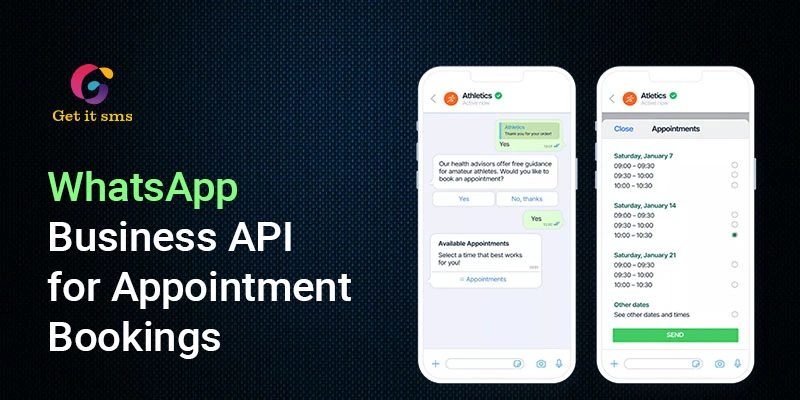
WhatsApp Business API for appointment booking is a solution that lets businesses manage and automate appointment scheduling, confirmations, and reminders right inside WhatsApp. Instead of calling a business or filling out long forms, customers can confirm, reschedule, and cancel appointments with just a tap. Here’s how it works:
- A customer sends messages or taps a “Book Now” button.
- A chatbot automatically sends a message asking for the service needed or shows an open time slot.
- The customer picks the slot and checks your CRM or calendar in real time.
- An automated confirmation message is sent right away using a pre-approved template.
- Later, a reminder message is sent closer to the appointment with a quick reply button to reschedule, confirm, and cancel.
Using a WhatsApp AI chatbot for booking, this entire cycle can be handled with minimal intervention and better response times. In short, it helps brands cut down missed calls and manual work, and keep time slots synced to avoid double bookings.
Why Businesses Choose WhatsApp API for Appointment Booking?
Here are the key benefits of using the WhatsApp API for appointment booking:
- Better Customer Experience: Customers can book, confirm, reschedule, or cancel without switching between calls, emails, and booking forms. Everything stays in one place while delivering a seamless customer experience.
- 24/7 Automated Scheduling: AI chatbots can guide customers through service selection, show available slots, and confirm appointments instantly. It lets customers book any time of day without waiting until the next day for a human agent to respond.
- Reduce No-Shows: Automated WhatsApp reminders keep upcoming appointments top of mind and reduce missed appointments by 25%.
- Seamless Calendar & CRM Integration: Businesses can seamlessly connect WhatsApp with CRM and other tools like Google Calendar and payment systems to automatically update appointment information. It helps prevent double bookings, minimizes manual data entry, and keeps information organized.
- Boost Appointment Conversions: A simple booking process and immediate responses boost appointment conversions. This simplicity is also a reason why WhatsApp Business API works well for sales and marketing more broadly.
Key WhatsApp Features That Power Smarter Appointment Booking
The WhatsApp Business API includes several features that make appointment booking faster and easier.
| Feature | What It Does | How It Helps With Booking |
| Click-to-WhatsApp Ads | Opens a WhatsApp chat directly from Facebook or Instagram ads. | Turns interested prospects into booking conversations with fewer steps. |
| AI Chatbot Automation | Answers questions, collects details, checks availability, and guides customers through booking. | Handles routine booking requests without constant human support. |
| WhatsApp Flows | Provides an interactive form for selecting services, dates, and time slots. | Makes booking faster without long back-and-forth chats. |
| Quick Replies & List Buttons | Lets customers select services and time slots with a tap. | Reduces typing, errors, and booking delays. |
| Calendar & CRM Sync | Connects WhatsApp with calendars, CRMs, and booking systems. | Keeps availability updated and helps prevent double bookings. |
| Payment Collection | Allows businesses to collect deposits or booking fees through supported payment options. | Helps confirm bookings and reduce last-minute cancellations. |
| Location Sharing | Sends the appointment location or directions through WhatsApp. | Makes it easier for customers to find the business. |
| Multi-Agent Handover | Transfers complex conversations from the chatbot to a human agent. | Ensures customers can get personal help when automation is not enough. |
Combined, these features turn a simple messaging channel into a complete appointment booking and communication system.
WhatsApp Business API for Appointment Booking: Industry Use Cases
The WhatsApp API for appointment booking can be used by almost any business that depends on scheduled appointments, consultations, or service visits. Here’s how different industries can use it:
1. Healthcare & Clinics
Clinics can use the official Meta Business API to simplify patient appointment scheduling. They can even deploy an AI chatbot to ask what type of appointment the patient needs, show available doctors and time slots, and confirm booking automatically. This eliminates the need for phone calls and makes it easier for clients to manage their appointments.
2. Salons & Spas
Salons and spas can use the API to enable clients to book services like haircuts, facials, massages, and beauty treatments. Customers can pick their preferred services, stylist, and time without waiting for staff members to respond. Learn more about how to use WhatsApp Business API for salons & Spas.
3. Education & Coaching
Coaching centres, tutors, and educational institutes can use the WhatsApp API to schedule demo classes or counselling sessions. Automated appointment reminders reduce missed sessions and make scheduling easier for students.
4. Automotive Service Centers
Car dealerships and service centres can leverage the API for service appointments, test drives, vehicle inspections, and maintenance bookings. It reduces back-and-forth calls, and automated reminders reduce missed appointments.
5. Real Estate
Confirm property visits, site tours, and agent consultations using WhatsApp API. When a lead shows interest in a property, an automated WhatsApp flow can help them choose a convenient visiting time. Learn more about using WhatsApp Business API for real estate.
6. Consulting & Professional Services
Consultants, lawyers, financial advisors, and other professionals can use WhatsApp automation to schedule consultations and client meetings. Customers can confirm, reschedule, or cancel bookings with just a tap, and reminders help reduce missed meetings.
WhatsApp Message Templates for Appointment Booking
WhatsApp message templates help businesses send appointment confirmations, reminders, rescheduling updates, and follow-ups at the right time. These pre-approved messages keep customers informed without requiring manual replies.
1. Appointment Confirmation
“Hi [Customer Name], your appointment booking for [Service] at [Brand name] is confirmed for [date] at [time]. See you then!”
When to send: Right after the moment the customer confirms a slot.
2. Appointment Reminder
“Hey [Customer Name], this is a gentle reminder for your [service] appointment tomorrow at [Brand name]. Please tap confirm to keep your appointment, or reschedule to choose another time.
[Confirm] [Reschedule]”
When to send it: One day before the appointment, so there’s still time to reschedule if needed.
3. Same-Day Reminder
“Hi [Customer name], your [service] appointment is today at [time]. Be on time, and we’ll see you soon at [location].”
When to send: A few hours before the appointment to remind customers
4. Rescheduling Confirmation
“ Hey [Customer name], your appointment has been rescheduled successfully for [date] at [time]. We love to serve you!”
When to send it: Whenever a booking time changes.
5. Cancellation Confirmation
“Hi [Customer Name], your [service] appointment for [date] at [time] has been cancelled. Connect with us now in case you want to book another slot.”
When to send: The moment the customer cancels their slot.
6. Post-Appointment Follow-Up
“Hi [Customer name], thank you for visiting us today. We hope you liked your experience. Please share your valuable feedback with us to help us improve.”
When to send it: Shortly after the appointment or service has been delivered.
Here’s how to create a WhatsApp API interactive message template.
Why GetItSMS Is a Smart Choice for Appointment-Based Businesses
To get started with WhatsApp marketing automation for appointment booking, you need to access the WhatsApp Business API. That’s where platforms like GetItSMS come in to help you get started.
Being an official WhatsApp Business API provider, the platform gives appointment-based businesses everything they need to manage bookings, reminders, and customer conversations.
- Instant access to the WhatsApp API with onboarding support.
- Omnichannel support that includes WhatsApp along with RCS messaging, bulk SMS, and voice.
- No-code WhatsApp chatbot to handle bookings, answer FAQs, and offer 24/7 availability.
- Automated workflows for confirmations, reminders, reschedules, and no-show follow-ups.
- Seamless CRM and calendar integration to keep every appointment synced and organized.
- Interactive buttons and WhatsApp Flows for a faster, tap-based booking experience
- Shared team inbox for managing customer conversations across multiple staff or locations.
- WhatsApp broadcasts for promotions, seasonal offers, and service updates.
- Analytics to track bookings, reminders, and no-show rates over time.
GetItSMS helps appointment-based businesses reduce missed calls, eliminate no-shows, and keep each booking organized without adding any extra manual work. Ready to get started with WhatsApp Business API for appointment booking? Connect with GetItSMS today.
Conclusion
WhatsApp Business API for Appointment Booking helps businesses transform a simple messaging channel into a fully automated scheduling engine. Rather than relying on phone calls or manual follow-ups, businesses enable customers to book, confirm, reschedule, and cancel appointments directly via WhatsApp. With features like AI chatbots, WhatsApp Flows, CRM integration, and automated reminders, businesses can boost conversion, automate scheduling 24/7, and deliver a better customer experience.
The aim is not just to automate bookings but to create a smoother customer experience while saving staff time. If you are ready to bring this into your business, connect with GetItSMS today to get started instantly without any technical hassle. From official API access with strong onboarding support, CRM integration, automated workflows, to an AI chatbot, the platform offers everything under one roof to automate appointment booking.
Frequently Asked Questions
No. Using the Meta Business API is not free. It generally includes Meta’s per-message cost and platform charges of your chosen provider.
Yes. Customers can start a conversation with businesses directly via a click-to-WhatsApp ad, website link, and QR code without saving your number first.
Yes. Small businesses can also use the WhatsApp API to automate bookings, reminders, and customer communication while saving time and reducing workload for human agents.
Yes. Brands can share a payment link or use in-chat WhatsApp payments to collect deposits or booking fees directly within WhatsApp.
To get started with WhatsApp API for appointment booking, businesses need to access the API via an official WhatsApp Business API provider like GetItSMS. The platform offers instant access to the WhatsApp API with features like AI chatbots, bulk broadcasting, a shared team inbox, and automation workflows.
Get your business on WhatsApp with GatitSMS
Try for freeRecent Posts