

 within 24
Hrs +
60
Days Free API Panel
within 24
Hrs +
60
Days Free API Panel
WhatsApp Business API for Restaurants – Complete Guide
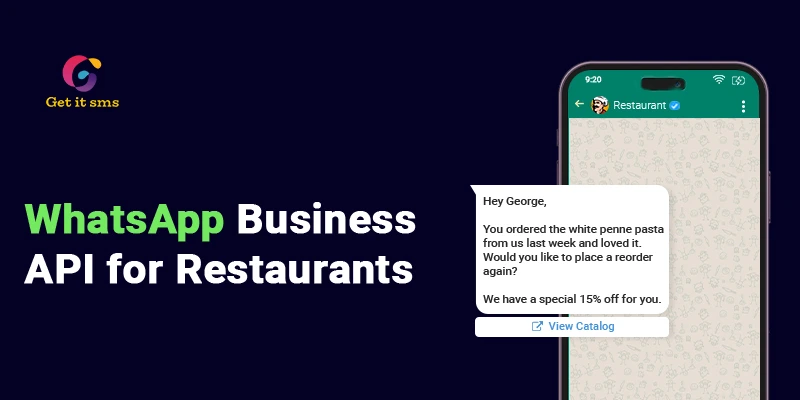
 3 minutes read
Last Updated :
September 3, 2026
Too Long? Read This First
- WhatsApp API for restaurants lets you manage orders, reservations, payments, and customer support directly using WhatsApp.
- Using this, restaurants can enables cuctomers browse your digital menu, place orders, and pay within the chat thread, and keep them well-updated at each stage.
- Key use cases include automated table reservations, real-time order tracking, promotional broadcasts, and instant feedback collection, all running without manual staff effort.
- Marketing strategies like click-to-WhatsApp ads, customer segmentation, and cardless loyalty programs help restaurants drive higher conversions and repeat visits.
- WhatsApp Business API providers like GetItSMS make setup simple with a ready-to-use dashboard, chatbot builder, and full API integration support.
chat_bubble
Want To Send Bulk SMS?
If yes, then test our service for FREE.
Want To Send WhatsApp Msg?
If yes, then test our service for FREE.
code
Get a Free Trial of WhatsApp API
WhatsApp Business API for restaurants is reshaping how the food industry handles orders, reservations, and connects with customers. And restaurants, cafes, or hotels not using it are just losing ground.
With massive competition in the food industry, just being visible is not enough any longer. Customers need instant accessibility to your restaurant on the channel they already use. Plus, long wait times, missed orders, and zero post-visit follow-up are killing the repeat business.
The WhatsApp API for a restaurant business fixes all. It enables restaurants to automate orders, run personalized re-engagement campaigns, send instant confirmation, and bring the digital menu into customers’ pockets using the app (WhatsApp) your customers already love.
This guide will cover how to use WhatsApp Business API for restaurants, including key benefits, real use cases, marketing strategies, and how to get started.
What is WhatsApp Business API for Restaurants?
WhatsApp Business API for restaurants is an application programming interface that links restaurants directly with interested potential prospects using WhatsApp. It allows restaurants to handle unlimited customer chats simultaneously, streamline operations, and drive direct orders without losing revenue to third-party delivery apps.
Using WhatsApp Business API, restaurants can:
- Accept, confirm, and process the food order automatically.
- Let the customer explore the digital menu with high-quality images
- Manage table reservations and bookings
- Broadcast weekend specials and festive offers
- Instant resolution to customer queries with an AI chatbot
- Track deliveries in real-time
Unlike the WhatsApp Business App built for small restaurants, the API is built for restaurant automation, multiple staff logins, CRM integration, and the ability to send messages at scale. But to make it work, you need a WhatsApp Business Solution provider like Getgabs or GetISMS to access the ready-to-use dashboard to achieve desired results.
Key Benefits of WhatsApp Business API for Restaurants
WhatsApp Business API does more than send messages. It changes how customers experience your restaurant, from the first message to the last bite.
- Order and Pay Without Leaving the Chat: Enable your customer to browse the menu, place an order, and pay within the WhatsApp chat window. No extra download or switching apps needed.
- Share a Digital Menu Instantly: Send the entire menu with top-notch images, prices, and descriptions directly to customers. It makes it easier for them to browse the dishes and place an order.
- Automate Reservations and Confirmations: Restaurants can automatically handle booking requests, update the reservation schedule, and send instant booking confirmations. It eliminates manual efforts, minimizes booking mistakes, and makes the entire booking process easier.
- Seamless CRM Integration: Connect WhatsApp with the CRM system to store and track customer information, interactions, and dining preferences in one place. It helps provide more personalized services and simplifies customer management.
- Direct Food Ordering Without Commission: Food delivery platforms charge 15-30% commission on every order. That’s a good amount from your everyday sale. API lets your customers directly order from you by eliminating the middleman and commission.
- Easy Team Collaboration: Use a shared team inbox with one WhatsApp number to enable multiple staff to manage customer messages, assign chats, and collaborate. It improves response time and keeps the whole team on the same page.
- Build Customer Trust and Credibility: Get a WhatsApp blue tick verification badge beside your business profile to help customers instantly recognize your official restaurant account, improve trust, and confidence in each interaction.
Top Use Cases of WhatsApp Business API for Restaurants
1. Automated Table Reservations & Reminders
Missed calls, double bookings, and no-shows cost restaurants real money. With WhatsApp API, your customer can book a table directly via chat, while the chatbot automatically:
- Check real-time availability.
- Guest’s name, time, and party size get automatically collected.
- Instant booking confirmation without any staff needed.
Pro Tip: Set up an automated reminder before the reservation with a one-tap confirm or cancel button. It reduces no-shows, double booking risk, and keeps your table filled.
2. Direct Ordering With Interactive Catalogs
Use the WhatsApp catalog to let customers browse your complete menu with images, prices, and descriptions right within the chat. Here’s how it flows:
- The customer browses the interactive catalog.
- Add items to their cart.
- Place an order and pay without leaving the app
- Receive instant confirmation, and the order goes straight to your kitchen.
It cuts out third-party delivery commission and makes the order process effortless for customers by eliminating the friction.
3. Real-Time Order and Delivery Updates
Customers get anxious when they don’t know where their food is. Use the WhatsApp API to send automatic updates at each stage:
- Order received and confirmed
- Being prepared
- Out for delivery
- Arriving in 10 minutes
It keeps your customer well-informed about their orders and results in fewer calls to your team regarding orders.
4. Promotional Broadcasts and Loyalty Campaigns
Got a weekend special or slow Tuesday to fill? Broadcast promotional messages, festive offers, and reward points to your loyal customers. Here’s what restaurants can send:
- Weekend specials and happy hour deals
- Festive offers and seasonal menus
- Exclusive discounts for repeat customers
This drives impulse orders during your slowest hours and keeps customers coming back to your restaurant.
Pro Tip: Segment your contact list before broadcasting to send the right offer to the right customer.
5. Instant Feedback and Reviews
Customers don’t like to fill out those long or boring forms. Send automated messages asking for quick feedback or to leave a Google review right after a delivery or dine-in.
- Enable customers to rate their experience from 1-5 stars with a single tap.
- Send the direct Google review link to boost restaurant ratings.
- Route negative feedback internally for quick resolution.
A simple “How was your meal?” A message after 30 minutes catches the customer while the experience is still fresh, enhances response rate, and helps you improve.
6. Automated FAQs and Customer Support
Your staff can’t be available 24/7. But restaurants can deploy a WhatsApp chatbot to offer around-the-clock assistance and automate responses to common customer queries like:
- Opening hours, location, and reservation policies.
- Menu details, today’s special menu, and allergen questions.
- How to cancel or modify orders?
It saves a lot of time for your team on repeat questions and delivers an instant answer to customer queries at any hour of the day.
Marketing Strategies to Use WhatsApp for Restaurants
Here are some of the most effective WhatsApp marketing strategies for restaurants:
1. Click-to-WhatsApp Ads
Run ads that click to WhatsApp on Facebook or Instagram. It drives high-intent leads directly into your inbox to ask queries with just a single tap and eliminates the friction by skipping the landing page or forms.
2. Segment Before You Broadcast
Divide your customers using tags based on what they order, how often they visit, and whether they are vegetarian or non-vegetarian, or by location. It helps you deliver the right message to the right person and boost conversion.
3. Always Get Opt-In Consent
Always collect customer opt-ins before sending messages to keep your cafe or hotel’s business in compliance and protect it from getting marked as spam.
4. Launch a Cardless Loyalty Program
Skip those paper punch cards. Run your entire loyalty program by sending automated points updates and milestone rewards right inside WhatsApp.
5. WhatsApp Catalog for Digital Menu
Your catalog is your 24/7 digital menu. Keep it updated with the current dishes, prices, and high-quality images to let customers easily browse, pick, and order without leaving the chat.
6. Recover Abandoned Carts Automatically
Customer added items but didn’t check out? Send an automated follow-up message with small discounts to encourage customers to complete the order.
7. Post-Visit Re-engagement
The easiest customer to win is one who has already visited. Send a follow-up message after each dine-in or delivery with a thank you note, a feedback request, or an exclusive offer to turn a one-time visitor into a loyal customer.
How To Get a WhatsApp API for Restaurants?
You can communicate through the WhatsApp Business API, and this is only possible with a reliable WhatsApp Business Solution Provider or BSP like GetItSMS. Follow these easy steps to get the official WhatsApp Business API for your business.
- At the initial level, sign up or log in to the Getgabs panel.
- Move to manual onboarding on the left side panel.
- To create an app, a Facebook developer account is used.
- Link a non-WhatsApp or new WhatsApp number to the API setup.
- Upload the required documents, like GST and MSME, to verify your company account on Meta. Verify that the business number will be used for the API.
- Move to the Getgabs app and add needed details, including app ID, phone number, and display. Once details are added, the account status will be changed to Green.
Congrats, you’re all set to communicate with your customers! Start broadcasting now.
Conclusion
WhatsApp Business API for restaurants is a must-have for modern restaurants to stay competitive and scale without depending on a third-party platform. Any problem like a missed reservation, an unanswered query or a zero repeat visit that costs your restaurant real money has a direct solution inside the WhatsApp API. From automated table reservations, sending real-time order updates, to running personalized loyalty campaigns, it helps restaurants automate support, boost customer engagement, and drive results from the most used messaging platform.
The restaurants, hotels, bistro, or cafe winning today are not just serving great food. Along with that, they are simply connecting with customers instantly and smartly on the channel they are already familiar with. And the best part is that getting started is easier than you think. With WhatsApp Business Solution Providers like Getgabs, your restaurant business can get the WhatsApp Business API integrated today.
Frequently Asked Questions
No. WhatsApp Business API is not free. You have to pay Meta’s conversation charges based on message category and country. Plus, you have to pay fees charged by your chosen Business Solution Provider (BSP).
No. As long as your customer has opted in to receive a message from your restaurant, they can receive your messages without saving your number.
WhatsApp Business Solution Providers (BSPs) like Getgabs or GetItSMS are highly preferred as the best options. They offer features like WhatsApp Automation, an AI chatbot, and pre-written templates.
Yes. All messages on WhatsApp are end-to-end encrypted, which ensures no one other than the recipients and the sender has access to the chat. Plus, the payment link shared via WhatsApp is processed via a verified payment gateway.
No. Platforms like Getgabs or GetItSMS offer you a ready-to-use dashboard with pre-built templates, a drag-and-drop chatbot flow builder, and automation tools. You don’t need any coding skills.
Get your business on WhatsApp with GatitSMS
Try for freeRecent Posts